10 Essential Insights to Kickstart Click to watch the video

Sage Active Public API V2 documentation

What's new

  • 2026 June (V1)

    New fields for credit notes, users, accounting entries, and organizations  

    This release introduces new Public API fields for credit note generation, user identity details, grouped invoice creation, and sales withholding setup.

    Read more ...

    This release introduces new Public API fields for credit note generation, user identity details, grouped invoice creation, and sales withholding setup.

    Public API Improvements

    Simplified Invoices


    New Fields or Values


    New Fields or Values (Portuguese Legislation)


    Organization IRPF Setup


    • API resources / Organization IRPF SetuporganizationIrpfSetupByOrgId to retrieve the IRPF withholding setup configured for an organization (Spain only).

    Documentation Improvements

    Postman collection


    • New Postman collection for June
      The collection has been enhanced with new examples showcasing the latest operations and newly added fields.

      Embrace the future with our June Postman collection !

      Download the new Postman collection for June version: Quick start / 5. Test your first query in Postman

      Tips

      • To find out what’s new in the Postman collection, paste this icon in the filter field  🆕
      • To find out what has changed in the Postman collection, paste this icon in the filter field  ✏️
      • To find out all Actions in the Postman collection, paste this icon in the filter field  ⚙️
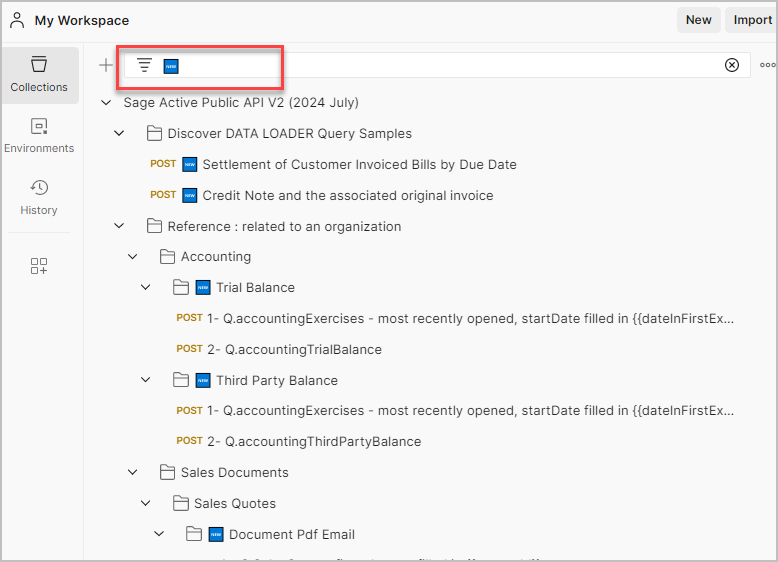
      img

      Caution

      If you are new to the Sage Active Public API V2, it is strongly recommended to fully follow the Quick start guide before beginning to explore the collection.

  • 2026 May (V1/V2)

    Unreconcile bank movements, Spanish simplified invoice fields

    This release adds unreconcileBankMovement so you can undo reconciliation for a bank movement using bankTransactionId only.
    It also introduces Public API fields for simplified invoices in Spain (organization defaults, customer flags, and per-invoice PDF options).

    Read more ...

    This release adds unreconcileBankMovement so you can undo reconciliation for a bank movement using bankTransactionId only.
    It also introduces Public API fields for simplified invoices in Spain (organization defaults, customer flags, and per-invoice PDF options).

    Public API Improvements

    Bank reconciliation
    Simplified invoices (Spain)

    New fields will support simplified invoices for the Spanish market (non-identified customers): organization-level defaults, customer-level defaults for new invoices, and per-invoice PDF options.

    New Fields or Values
  • 2026 April (V1/V2)

    Bank reconciliation documentation refresh and new Sales Invoices capabilities

    This release focuses on clearer bank reconciliation documentation and a new Sales Invoices field to manage operational number presets.
    It also announces upcoming support for simplified invoices in Spain with organization, customer, and document-level options.

    Read more ...

    This release focuses on clearer bank reconciliation documentation and a new Sales Invoices field to manage operational number presets.
    It also announces upcoming support for simplified invoices in Spain with organization, customer, and document-level options.

    Public API Improvements

    New Fields or Values

    Sales Documents The following field will be added: - operationalNumberPresetTextId - Allows assigning the selected prefix from the API resources / Operational Number Preset Texts list when creating a document.

    Bank reconciliation

    The Banks documentation has been restructured: shared description blocks (overview and detail pages use the same text) so connected accounts, imported movements, reconciliation, and rules are easier to follow end to end. Use these entry points:

  • 2026 March (V1 / V2 / V3)

    New APIs, aggregation capabilities, and accounting insights

    This release introduces new APIs to explore and query resources, enhanced aggregation capabilities, and new accounting and reporting endpoints.
    It also includes improvements to customer and supplier contacts management, along with new configuration services.

    Read more ...

    This release introduces new APIs to explore and query resources, enhanced aggregation capabilities, and new accounting and reporting endpoints.
    It also includes improvements to customer and supplier contacts management, along with new configuration services.

    Public API Improvements

    New Fields or Values
    • API resources / Customers
      A new field has been added on customer contacts to identify the default contact.
      • Use isDefaultCustomer to filter and retrieve the default contact for a customer.
      • Reliably identify the default contact, unlike isDefault, which is a computed field and cannot be used for filtering.
    • API resources / Suppliers
      A new field has been added on supplier contacts to identify the default contact.
      • Use isDefaultSupplier to filter and retrieve the default contact for a supplier.
      • Reliably identify the default contact, unlike isDefault, which is a computed field and cannot be used for filtering.
    Resource Listing APIs
    • API resources / 📝List Overview
      This page introduces the resource listing concept and explains how to retrieve data using the dedicated APIs.
      • An overview of how resources are exposed and structured.
      • The overall workflow to discover and query resources.
      • An introduction to the ListCatalog and ListExecute operations.
    • API resources / ⚙️List Catalog
      This endpoint allows you to discover available resources and their structure.
      • Retrieve the list of available resources.
      • Explore metadata and available fields.
      • Understand how to build queries before executing them.
    • API resources / ⚙️List Execute
      This endpoint allows you to query and retrieve data from resources.
      • Execute queries on a selected resource.
      • Apply filters and retrieve structured data.
      • Use catalog definitions to build dynamic queries.
    Resource Aggregation APIs
    • API resources / 📝Aggregations Overview
      This page introduces the new aggregation capabilities and explains how to compute aggregated data using dedicated APIs, as an alternative to the historical approach.
      • An overview of how aggregations are defined and used.
      • The overall workflow to discover and execute aggregations.
      • An introduction to the AggregationCatalog and AggregationExecute operations.
    • API resources / ⚙️Aggregation Catalog
      This endpoint allows you to discover available aggregations and their structure.
      • Retrieve the list of available aggregations.
      • Explore available measures, dimensions, and parameters.
      • Understand how to build aggregation queries before execution.
    • API resources / ⚙️Aggregation Execute
      This endpoint allows you to execute aggregation queries and retrieve computed results.
      • Execute aggregations on selected datasets.
      • Apply filters, groupings, and calculations.
      • Retrieve aggregated and structured results for reporting or analysis.
    Accounting Reports APIs
    • API resources / ⚙️Balance Sheet
      A new endpoint is available to retrieve Balance Sheet data.
      • Access structured Balance Sheet reports.
      • Retrieve financial positions based on accounting data.
      • Use filters and parameters to refine the reported data.
    • API resources / ⚙️Profit and loss
      A new endpoint is available to retrieve Profit and Loss data.
      • Access structured Profit and Loss reports.
      • Retrieve income and expense data over a selected period.
      • Use filters and parameters to refine the reported data.
    Third Party Code Mode Settings
    Transaction Categories
    • API resources / Transaction categories
      The Transaction Categories resource introduces a structured way to classify accounting operations.
      • Retrieve predefined categories used to classify purchase, non-invoice, and adjustment transactions.
      • Use the type field to filter categories based on their usage (e.g. PURCHASE, NON_INVOICE, ADJUSTMENTS).
      • Link categories to accounting accounts and tax treatments for consistent posting.
    • API resources / Suppliers
      The following field has been added:
      • transactionCategoryId – Allows assigning a purchase transaction category to automatically determine default accounting settings such as the purchase account and tax treatment.
    • API resources / Purchase invoices / PurchaseInvoiceLine
      The following field has been added:
      • transactionCategoryId – Currently read-only; data entry will be available in a future version to allow assigning a purchase transaction category and determine the appropriate accounting and tax configuration on the invoice.
    Accounting KPIs

    The Accounting KPIs service exposes a set of accounting indicators (Key Performance Indicators) that can be retrieved for a given organization.
    API resources / Accounting Kpis
    Each KPI corresponds to a standardized calculation on accounting balances, adapted per legislation (FR, ES, DE or PT).

    • Provides accounting ratios and indicators such as turnover, purchases, trade margin, equity, etc.
    • Adapts the calculation logic to the organization’s legislation.
    • Supports retrieval of one or multiple KPIs in a single call.
    Sales KPIs

    The Sales KPIs service provides a set of commercial indicators (Key Performance Indicators) that can be retrieved for a given organization.
    API resources / Sales Kpis
    Each KPI corresponds to a standardized calculation based on the organization’s sales and related data.

    • Provides sales performance indicators such as incoming and outgoing payments, value of open quotes, number of customers, etc.
    • Includes KPIs related to quotes conversion through their related sales documents.
    • Supports retrieval of one or multiple KPIs in a single call.
  • 2026 February

    Online payments, email templates, and document transformation

    The February release introduces online payments for sales invoices, email templates for automated document communication, and a sales document transformation flow. It also adds new API fields to improve payment mean management and document email behavior.

    Read more ...

    The February release introduces online payments for sales invoices, email templates for automated document communication, and a sales document transformation flow. It also adds new API fields to improve payment mean management and document email behavior.

    Public API Improvements

    New Fields or Values
    • API resources / Payment means
      The following fields has been added:
      • type – Indicates whether the payment mean is standard or used for online payment (PAYMENT_IN).
      • inactive – Indicates whether the payment mean is deactivated. Default value is false.
    • API resources / Sales invoices
      The following fields will be added:
      • canGeneratePaymentLink – Indicates whether the Invoice will generate an online payment link in the PDF, allowing customers to pay directly online.
      • invoiceEmail – Specifies the email address used to send the Invoice PDF containing the online payment link.
    Online Payment for Sales Invoices
    • API resources / 📝Invoice with Online Payment
      Online payment capability will be introduced for Sales Invoices.

      It will be possible to:

      • Generate an Invoice containing an online payment link directly in the PDF.
      • Enable this behavior using the canGeneratePaymentLink field.
      • Specify the recipient email using the invoiceEmail field.
      • Retrieve and use a Payment Mean with type = PAYMENT_IN to activate online payment.
      • Send or preview the Invoice PDF via DocumentPdfEmail or DocumentPdfPreview, including the online payment link.
    Email Templates for automated document communication
    • API resources / Email templates
      • Represents a collection of email templates used for sending automated emails related to business documents.
      • An Email Template defines the subject, content, and recipients of emails generated by the system, ensuring consistent and professional communication with customers and internal users.
      • Each email template is associated with a specific document type, such as quotes, orders, delivery notes, or invoices.
      • To use an email template through the API, the client application must first retrieve the template and then reuse its fields (subject, message, cc, bcc, sendMeCopy, etc.) when sending emails related to documents with API resources / ⚙️Document Pdf Email
    Sales Document Transformation Flow
    • API resources / 📝 Document Transformation Flow
      Sales documents can be transformed across the standard sales lifecycle (Quote → Order → Delivery Note → Invoice) without a dedicated transformation mutation.
      Instead, you use the standard creation mutations and provide origin metadata at line level:
      • originType – Type of the source document (QUOTE, ORDER, DELIVERY_NOTE)
      • originId – Identifier of the source document
      • originLineId – Identifier of the source document line

      This enables:

      • traceability across the sales flow
      • quantity management on source document lines
      • transforming from multiple source documents into a single target document

      The origin document must be in Pending status in order to be referenced by another document.

  • 2026 January

    Tenant removal, new services, and API expansion

    The January release simplifies the API by removing tenant-based logic, introduces new services such as ThirdPartyIdentification and File Management, and adds the Bank Account resource along with new fields across multiple entities.

    Read more ...

    The January release simplifies the API by removing tenant-based logic, introduces new services such as ThirdPartyIdentification and File Management, and adds the Bank Account resource along with new fields across multiple entities.

    Public API Improvements

    📌 Removal of tenantId from API request processing
    • Index of Important Terms
      • The tenantId is no longer required in request headers and is no longer used by the API.
      • Only the organizationId is now required to interact with the API.
      • For backward compatibility, providing a tenantId in the header is still accepted, but it is completely ignored and does not participate in authorization, routing, or data resolution.
      • When integrating with or maintaining code that uses the API, it is recommended to remove the tenantId from request headers to simplify integrations and avoid keeping unused technical concepts.
    Bank Account unified banking and accounting representation
    • API resources / ⚙️Bank Accounts
      Bank Accounts represent the aggregated view of a bank.
      They combine:
      • the definition of the bank account configured in Sage Active (payment method configuration),
      • and the banking information exposed by the bank, such as balances, synchronization status, and transaction availability.
    ThirdPartyIdentification service for French company lookup
    • API resources / ⚙️ Third Party Identification
      • The ThirdPartyIdentification service allows querying the SIRENE register of companies and establishments managed by INSEE.
      • It relies on the official French public registry SIRENE and therefore returns French companies only.
      • The service uses the French public Sirene open data API and returns identification data for French companies.
      • It is especially useful when creating customers or suppliers, helping to find a company and retrieve its identification data, including the address.
      • It can also be used to retrieve establishments by business activity (APE / NAF), city, or street for prospecting and qualification purposes.
    File Management

    A dedicated File Management section has been introduced as part of the federated schema.
    API resources / 📝Files Management

    • Provides the core functionalities to upload, retrieve, and manage files associated with business entities such as customers, suppliers, or accounting entries.
    • Supports common document types like invoices, receipts, or supporting attachments linked to operational records.
    • Enables direct file uploads through GraphQL using the Upload scalar type.
    • Allows file retrieval with advanced filters using the files query.
    • Provides short-lived access links (downloadPath, previewPath) for secure file download or in-browser preview.
    • Includes options to download by ID and export multiple files as ZIP packages with an index.
    • All uploaded files are virus-scanned and encrypted before storage, ensuring safety and confidentiality.

    img

    Withholding (ES legislation)
    New Fields or Values
    Email Templates for automated document communication
    • API resources / Email templates
      • Represents a collection of email templates used for sending automated emails related to business documents.
      • An Email Template defines the subject, content, and recipients of emails generated by the system, ensuring consistent and professional communication with customers and internal users.
      • Each email template is associated with a specific document type, such as quotes, orders, delivery notes, or invoices.
      • To use an email template through the API, the client application must first retrieve the template and then reuse its fields (subject, message, cc, bcc, sendMeCopy, etc.) when sending emails related to documents with API resources / ⚙️Document Pdf Email
  • 2025 December

    Advanced Invoices, Ask AI

    The December release introduces a major functional milestone with the release of Advanced Invoices and the integration of the new Ask AI assistant into the documentation.
    It extends the Public API with improved interoperability between sales documents, the introduction of advance payment management, and the upcoming integration of File Management and KPI services.

    Read more ...

    The December release introduces a major functional milestone with the release of Advanced Invoices and the integration of the new Ask AI assistant into the documentation.
    It extends the Public API with improved interoperability between sales documents, the introduction of advance payment management, and the upcoming integration of File Management and KPI services.

    Public API Improvements

    New Fields or Values
    • API resources / Sales invoices
      The following field has been added:
      • sourceId – ID of the advance invoice linked to this deduction line. It must contain the ID of the advance invoice that was previously created and stored.
        This field is only used during creation and is not available in read operations.
        This ensures proper linkage between the advance and the final invoice and guarantees accounting consistency.
        More info: API resources / 📝Advance Invoice
    Advanced Invoices

    The Advanced Invoices feature provides full support for creating advance invoices and applying advance payment deductions when generating final invoices. API resources / 📝Advance Invoice

    • Allows the creation of advance invoices from quotes or orders, based on an advance amount defined by the user.
    • Uses the ADVANCE_PAYMENT product (legislation-dependent, for example ACOMPTE in France) to represent advance payment lines.
    • Supports the generation of final invoices with automatic deduction of previously issued advance invoices for the same customer.
    • Deduction is performed by adding lines with a negative quantity of the ADVANCE_PAYMENT product.
    • Each deduction line must reference the original advance invoice through the sourceId field.
    • Fully compatible with the standard createSalesInvoice mutation used for classical invoice creation.

    Documentation Improvements

    Ask AI - Contextual Assistant in the Documentation

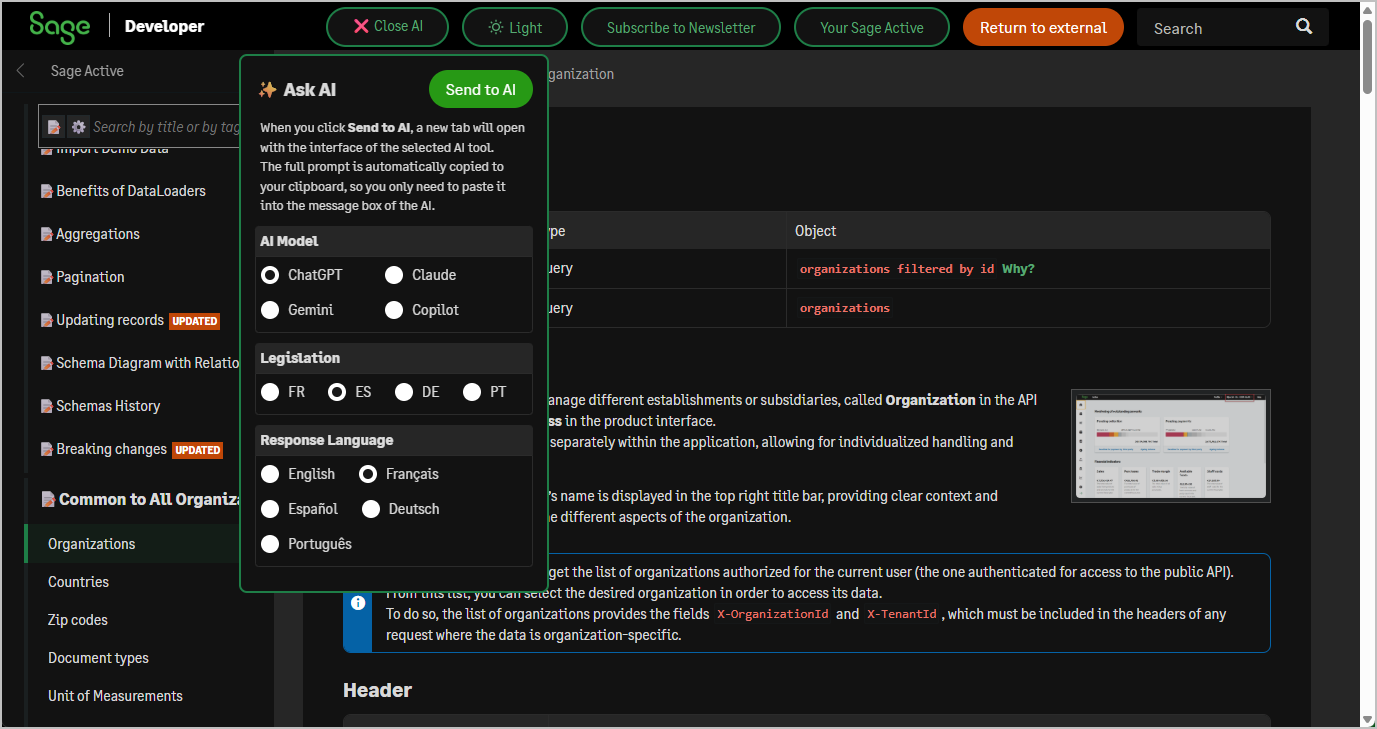
    A new Ask AI feature is now available in the documentation to help you understand each API resource more quickly.
    With a single click, you can automatically generate a fully contextualized prompt based on the current page, your selected legislation, the response language, and the chosen AI tool (ChatGPT, Claude, Gemini, or Copilot).
    The prompt is automatically copied to your clipboard, and a new tab opens directly on the selected AI interface.
    You simply paste and start interacting. This assistant is especially useful for getting quick summaries, asking integration questions, or analyzing legislation-specific behaviors using the official documentation and the Postman collection.

    img

  • 2025 November / October

    Stability, performance, and new functional capabilities

    The November / October release focuses on consolidating the latest evolutions of the Public API and extending its functional coverage.
    It brings enhanced interoperability between sales documents, improved file management integration, and additional fields now available in production.
    These improvements strengthen the foundation for future releases while maintaining backward compatibility and performance.

    Read more ...

    The November / October release focuses on consolidating the latest evolutions of the Public API and extending its functional coverage.
    It brings enhanced interoperability between sales documents, improved file management integration, and additional fields now available in production.
    These improvements strengthen the foundation for future releases while maintaining backward compatibility and performance.

    Public API Improvements

    Related sales documents, known as RelatedSalesDocument in the API context and Related documents in the product interface.
    API resources / Related sales documents
    This resource is used to represent relationships between sales documents (for example, when a quote is converted into an order or an invoice).
    It stores both the link (originId) and the type of the origin document (originDocumentType), enabling you to navigate between related sales flows.

    The LinkRelatedSalesDocument service allows you to establish a relationship between two existing sales documents, when the transformation is allowed.
    API resources / ⚙️ Link related sales documents
    As soon as a sales document is created, an entry is automatically added in RelatedSalesDocument for it.
    This action updates the related record by setting the originId with the identifier of the origin document.

    New Fields or Values
  • 2025 September

    Analytic dimensions, HotChocolate 15, and extended update logic

    The September release introduces analytic dimensions, delivers major runtime and federation upgrades with HotChocolate 15, and continues the rollout of the replaceAll logic for precise control over sub-resource updates.
    It also includes several new fields across core entities, further strengthening consistency of the public schema.

    Read more ...

    The September release introduces analytic dimensions, delivers major runtime and federation upgrades with HotChocolate 15, and continues the rollout of the replaceAll logic for precise control over sub-resource updates.
    It also includes several new fields across core entities, further strengthening consistency of the public schema.

    Public API Improvements

    New Fields or Values
    • API resources / Accounting Entries / AccountingEntryTax
      The following fields are added to accountingEntries/accountingEntryLines/accountingEntryInvoice/accountingEntryTaxes:
      • hasEquivalenceSurcharge – Indicates whether the equivalence surcharge is applied (ES only).
      • equivalenceSurchargePercentage – Percentage applied for equivalence surcharge (ES only).
      • equivalenceSurchargeQuota – Fixed amount for equivalence surcharge quota when applicable (ES only).
    • API resources / Customers
      The following fields are added:
      • customerType – Indicates the type of customer: business or individual. Defaults to BUSINESS if not specified.
      • specialMention – Free-text entry area intended to be printed or included on the final invoice sent to the customer.
    • API resources / Sales invoices The following field is added:
      • specialMention – Free-text entry area intended to be printed or included on the final invoice sent to the customer.
    • API resources / Accounting Accounts The following field is added:
      • includeEurForGermany – Indicates whether the account is considered in the EÜR result for Germany only.
    • Sales Documents The following field is added to salesQuotes, salesOrders, salesDeliveryNotes, and salesInvoices:
      • externalReference – External customer reference provided to facilitate communication and tracking.
    • API resources / Organization Accounting Setup The following fields is added:
      • defaultBankingAdjustmentsId – Used when adding a bank fee, interest, or other adjustments during reconciliation.
      • defaultBankingTransactionsId – Used when reconciling your bank transactions against items that are not sales or purchase invoices.
    • API resources / Organization Sales Setup The following fields is added (read-only):
      • salesDeliveryNoteDefaultPresetTextId – Id of the Preset Text defined in Operational Number Preset Texts.
      • salesOrderDefaultPresetTextId – Id of the Preset Text defined in Operational Number Preset Texts.
    ReplaceAll in Update Mutations

    Key concepts / Updating records

    • The requestedAction mechanism and the full patch-style update logic are already available in the current version of the API.
    • Support for the new replaceAll logic is included in the upcoming release.
    • This feature allows full replacement of sub-resource collections by specifying which collections should be replaced using an array of enum values (e.g. ["CONTACTS"], ["PHONES", "EMAILS"]).
    • The replaceAll directive is declared at the same level as the entity being updated (e.g. on a customer or a contact) and applies to its child collections.
    • It enables use cases such as:
      • Replacing a customer’s entire list of contacts and addresses.
      • Replacing only a specific contact’s phones, emails, or social medias.
      • Replacing all salesInvoiceLines within a sales invoice.
    • This hybrid approach, patch by default, with optional explicit replaceAll per collection, allows both fine-grained updates and full structure replacement, depending on the integrator’s capabilities.
    HotChocolate 15 and GraphQL Federation

    The new version of the API adopts HotChocolate 15, replacing the previous HotChocolate 13 runtime.

    • This technical upgrade is a key enabler for integration with the GraphQL federation gateway, powered by HotChocolate Fusion.
      It allows multiple distinct APIs to be exposed through a single unified schema, providing a seamless experience for clients consuming resources from different domains.

    • One immediate benefit is the ability to introduce new specialized APIs, such as File Management, without changing existing entry points.
      These APIs can be independently deployed and scaled, while remaining fully integrated at schema level.

    • The migration to HotChocolate 15 also improves compatibility with modern tooling, enforces stronger schema consistency, and simplifies the introduction of advanced features like directive-based caching, custom scalar enhancements, and better schema stitching options.

    No changes are required in client queries for now. However, integrators should monitor announcements as new federated modules become available.

    Documentation Improvements

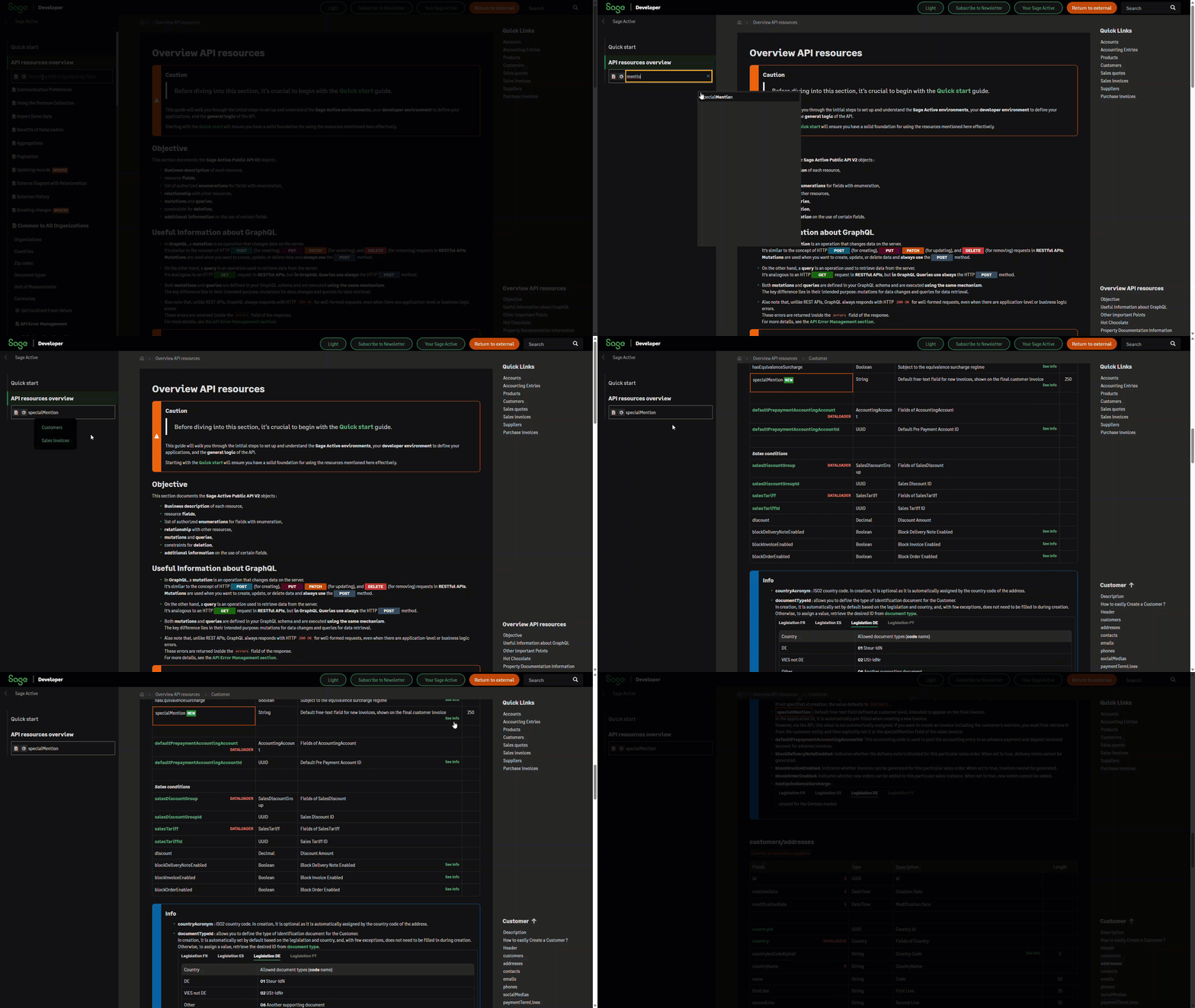
    Enhanced Resource Search by Field Name

    • The resource search field has been enhanced: you can now filter not only by entity name (contains) but also by field name (contains).
    • The list of fields is displayed alphabetically, with a first block showing fields that start with the searched value, followed by fields that contain it.
    • Selecting a field displays the list of entities where this field is present. From the entity page, the field name is automatically highlighted: the page scrolls to its position and applies a visual highlight for easier identification.
    • If a field has a “See Info” tag, clicking its link scrolls directly to the dedicated info section and highlights the corresponding field for better visibility.

    img

  • 2025 July

    Schema clean-up, analytic dimensions, and future-proof update logic

    The July release focuses on schema consistency and prepares the ground for upcoming improvements in update operations.
    It includes new support for analytic dimensions, significant clean-up of obsolete schema elements, and continued rollout of the replaceAll logic for precise control over sub-resource updates.

    Read more ...

    The July release focuses on schema consistency and prepares the ground for upcoming improvements in update operations.
    It includes new support for analytic dimensions, significant clean-up of obsolete schema elements, and continued rollout of the replaceAll logic for precise control over sub-resource updates.

    Public API Improvements

    New Fields or Values
    • API resources / Accounting Entries / AccountingEntryPayment
      The following changes has been introduced to the sub-resources accountingEntryLines / accountingEntryPayment :
      • matchId – Groups reconciled lines sharing the same matching letter, particularly when duplicates exist for the same third party.
      • accountingEntryPayments can now be queried directly.
        Use the accountingEntryLines dataloader to navigate back to the parent entry.
    • Analytic dimensions and tags are now supported throughout accounting entries and account setup.
      These new features allow you to allocate amounts across analytic axes (e.g. Warehouse, Department) at line level, and define default allocation rules at account level.

  • 2025 June

    Aggregations, new fields to streamline data updates

    The June release adds support for new aggregation types, such as __count and DISTINCTCOUNT, and prepares upcoming changes with the introduction of the replaceAll logic for updates.
    It also includes new fields for suppliers, customers, and sales documents, supporting improved data handling and integration flexibility.

    Read more ...

    The June release adds support for new aggregation types, such as __count and DISTINCTCOUNT, and prepares upcoming changes with the introduction of the replaceAll logic for updates.
    It also includes new fields for suppliers, customers, and sales documents, supporting improved data handling and integration flexibility.

    Extended Aggregations Syntax

    API resources / 📝Aggregations (historical approach)

    Two new aggregation types are added: __count and DISTINCTCOUNT.

    • __count counts records in each group, regardless of field:

      aggregateFields: ["__count"]
      
    • DISTINCTCOUNT counts distinct values of a field in each group:

      aggregateFields: ["customerId|DISTINCTCOUNT"]
      

      For example, to get the number of unique customers per product sold through sales invoices.

    New Fields or Values
    • API resources / Customers API resources / Suppliers
      The following fields has been added:
      • viesCode – VIES value prefix of the European Community VAT numbers.
    • API resources / Suppliers
      The following fields has been added:
      • personalIncomeTax – Indicates if income tax is applied.
      • taxTreatmentId – TaxTreatment ID.
      • taxTreatment – Field of taxTreatment.
    • API resources / Organization Accounting Setup
      The following fields has been added:
      • defaultPayrollJournalTypeId – Default journal Payroll Id.
    • Sales Documents
      The following fields has been added:
      • order – Used to manage the line ordering when rearranging them.
        During creation and update, the order of the lines in the payload is automatically used to assign the correct order value to each line.

    Documentation Improvements

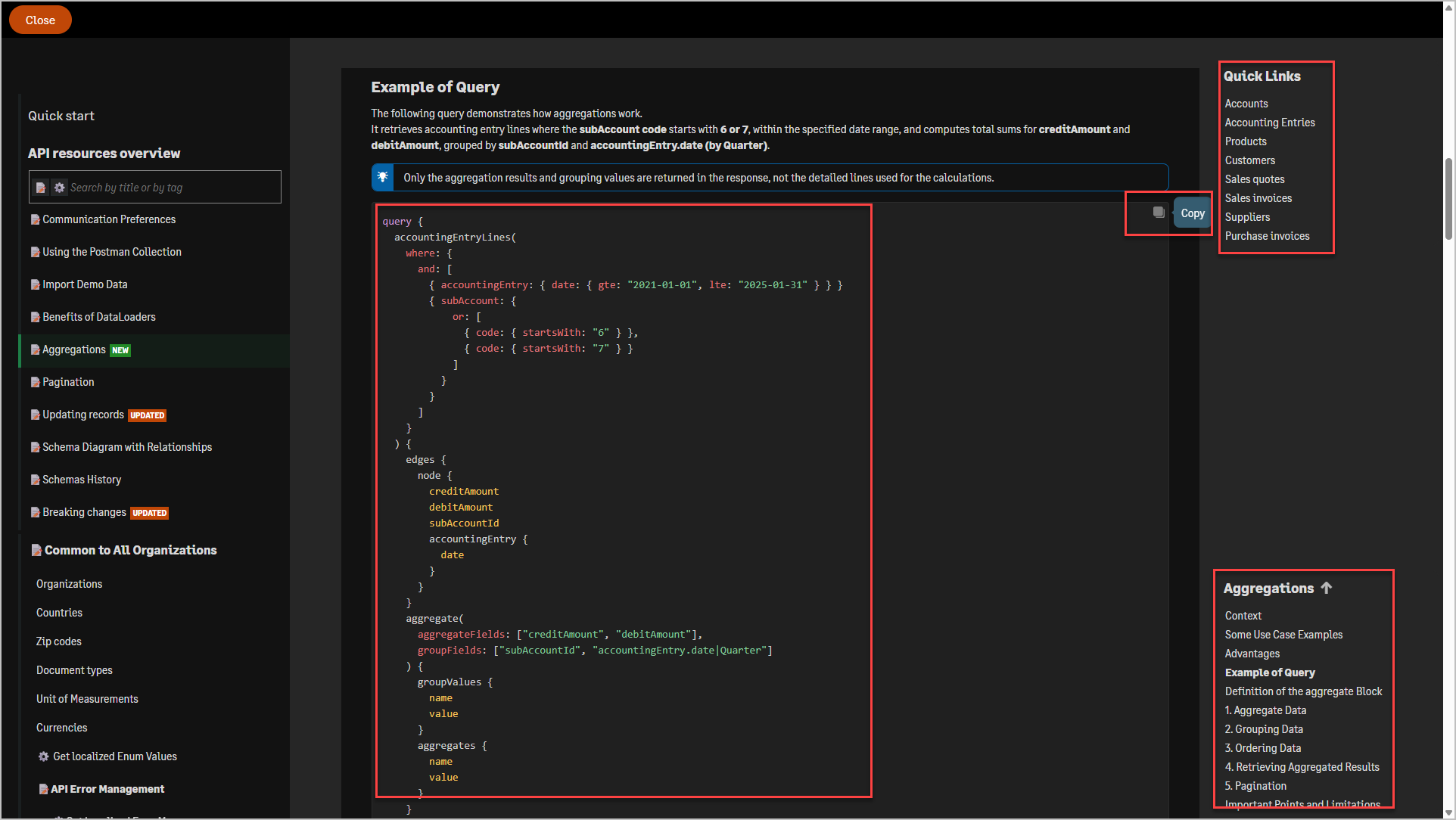
    - Improved syntax highlighting for GraphQL queries and JavaScript code examples, making them easier to read and understand. - A copy-to-clipboard icon has been added to the top right corner of every code block, allowing users to quickly copy example code with a single click. - Quick Links now appear at the top right of each documentation page, offering direct access to the most frequently used API resources. - A table of contents is available at the bottom right of each page, enabling quick navigation to different sections. As you scroll, a scroll spy mechanism highlights your current position within the page for better orientation.
    See an example of these improvements here: Sample

    img