- sessionId: the session identifier, this value is mandatory.
- session allows retrieving:
- id: the session identifier, which can be retrieved here or via sessionId.
- name: the session name (e.g.,
Automatisch erstellt) - stamp: the session name and timestamp (e.g.,
Automatisch erstellt 12.06.2024 10:20:04) - deactivated: the session status. When true, the session cannot be used for a new accounting entry.
Legislation rules
Quick Links
Accounts Accounting Entries Products Customers Sales quotes Sales invoices Suppliers Purchase invoicesQuick Links
Accounts Accounting Entries Products Customers Sales quotes Sales invoices Suppliers Purchase invoicesDescription
This page groups all legislation-specific rules for API fields whose behaviour varies depending on the organization’s legislation
(FR, ES, DE or PT).
The same information is also documented on each resource page concerned, next to the field it applies to. Use this page when you need a single cross-resource reference; use the individual resource pages for full field context.
Legislation-specific features
Some API resources or capabilities apply to a single legislation only. The pages below document those legislation-specific features in detail.
- API resources / 📝Cash VAT (🇫🇷 🇩🇪)
- API resources / 📝Accounting Entry Sessions (🇩🇪)
- API resources / Employees: Employee management is not available for the German legislation.
- No legislation-specific features documented yet.
Organizations
- documentTypeId: Id of an allowed document type, values are different depending on legislationCode
CountryAcronym Allowed document types (code name) FR 01 SIREN / SIRET CountryAcronym Allowed document types (code name) ES 01 NIF/DNI CountryAcronym Allowed document types (code name) DE 01 Steur-IdN CountryAcronym Allowed document types (code name) PT 01 NIF - documentId: Identification number, please note that each organization has a unique value.
- SIREN of 9 characters or any SIRET of 14 characters.
- valid NIF number.
- Steur-Idn of 11 characters
- (PT content to be validated with product team)
- useWithholdingTaxTreatmentId:
- Unused.
- useWithholdingForSales: Indicates whether withholding tax (IRPF) must be applied on sales documents for the organization. When enabled, sales invoices may include withholding tax according to Spanish fiscal rules.
- useWithholdingTaxTreatmentId: Defines the default tax treatment used to apply sales withholding tax when useWithholdingForSales is enabled.
- Unused.
- Unused.
- vatCriterion: Enable Cash VAT.
- When registering your business and depending on its type of activity, you can configure the type of VAT that will be automatically taken into account when performing entries.
- Not used (only for France and Germany)
- When registering your business and depending on its type of activity, you can configure the type of VAT that will be automatically taken into account when performing entries.
- When registering your business and depending on its type of activity, you can configure the type of VAT that will be automatically taken into account when performing entries.
- thirdPartyBillingVatNumber:
- Unused for the French market
- Unused for the Spanish market
- Unused for the German market
- (PT content to be validated with product team)
- taxAuditExportNotes:
- Not used (only for german legislation)
- Not used (only for german legislation)
- datevConsultantNumber: This is the identification number of the DATEV consultant. It is assigned to the tax advisor or accounting firm managing a company’s accounting within DATEV, a widely used software in Germany.
- datevClientNumber: This field represents the DATEV client identification number. It is assigned to each company registered in DATEV and helps associate accounting entries and financial transactions with the correct organization in the system.
- taxAuditExportNotes: This field allows adding specific notes to tax audit exports. These notes can be used to include accounting or regulatory details relevant to the organization when generating export files.
- Not used (only for German legislation)
- Not used (only for german legislation)
Document types
- name:
Country Allowed document types (code name) FR 01 SIRET VIES not FR 02 TVA Intracommunautaire Other 06 Autre document justificatif Country Allowed document types (code name) ES 01 NIF/DNI VIES not ES 02 NIF/IVA Other 03 Pasaporte Other 04 Documento oficial emitido en el país de residencia Other 05 Certificado de residencia Other 06 Otro documento probatorio Country Allowed document types (code name) DE 01 Steur-IdN VIES not DE 02 USt-IdNr Other 06 Another supporting document Country Allowed document types (code name) PT 01 NIF VIES not PT 02 NIF/IVA Other 06 Another supporting document
Accounting Accounts
- code: This explanation pertains to accounts where the accountLevel is
Subaccount. Refer to accountLevel for the structure of other account types.- Length: Variable, between 4 and 13 alphanumeric characters
- Initial characters: First 3 must be numeric
- Examples:
4110000,411DUPONT,445662000,445663,6010
- Length: Is composed of a fixed length between 5 and 13 digits
- Example:
572000000,606000000
- Length: Exactly 4 digits
- Example:
1530,3010
- Length: Length between 3 and 30 digits for transactional accounts
- Example:
211100000,211113000
- accountLevel:
- Group: Unused (For Spain only).
- Subgroup: Unused (For Spain only).
- Account: Unused (For Spain only).
- Breakdown: Unused (For Spain only).
- Subaccount: Accounting account of Detail. See code for account number structure rules.
OnlySubaccountaccounts can be used in accounting entries. - Total: Used for the balance guides. From 1 to 3 digits.
- Group: Accounting account of Total. Only 1 digit is allowed. Represents an element of the organization’s financial statement
- Subgroup: Accounting account of Total. Is composed of 2 digits. It’s a division of the financial statement element.
- Account: Accounting account of Total. Is composed of 3 digits. These are the accounts defined according to each country’s chart of accounts.
- Breakdown: Accounting account of Total. Is composed of 4 digits. It’s a division of the Account.
- Subaccount: Accounting account of Detail. Is composed of a fixed length between 5 and 13 digits.
OnlySubaccountaccounts can be used in accounting entries. - Total: Unused (For France only).
- Group: Unused (For Spain only).
- Subgroup: Unused (For Spain only).
- Account: Unused (For Spain only).
- Breakdown: Unused (For Spain only).
- Subaccount: Accounting account. Is composed of 4 digits.
OnlySubaccountaccounts can be used in accounting entries. - Total: Unused (For France only).
- Group: Unused (For Spain only).
- Subgroup: Unused (For Spain only).
- Account: Unused (For Spain only).
- Breakdown: Unused (For Spain only).
- Subaccount: Accounting account of Detail. See code for account number structure rules.
OnlySubaccountaccounts can be used in accounting entries. - Total: Used for the balance guides. From 1 to 3 digits.
- subAccountType: only used if accountLevel is set to
SUB_ACCOUNT.Only these values can be used:
- UNDEFINED
- CUSTOMER
- PROVIDER
- BANK
- CASH
- CHARGE
- REVENUE
- CAPITAL
- FIXED_ASSET
- MANAGEMENT_RESULT
- DEPRECIATION_PROVISION
- STOCK
- RESULT_BALANCE_SHEET
- EMPLOYEE
- TITLE
- CUSTOMER_PREPAYMENT_TAX_INCLUDED
- SUPPLIER_PREPAYMENT_TAX_INCLUDED
- INPUT_TAX
- OUTPUT_TAX
Only these values can be used:
- UNDEFINED
- CUSTOMER
- PROVIDER
- BANK
- CASH
- CHARGE
- REVENUE
- CAPITAL
- FIXED_ASSET
- EMPLOYEE
- CUSTOMER_RETURNABLE_PACKAGING
- SUPPLIER_RETURNABLE_PACKAGING
- INPUT_TAX
- OUTPUT_TAX
Only these values can be used:
- UNDEFINED
- CUSTOMER
- PROVIDER
- BANK
- CASH
- CHARGE
- REVENUE
- CAPITAL
- FIXED_ASSET
- MANAGEMENT_RESULT
- EMPLOYEE
- CURRENT_ASSETS
- BORROWED_CAPITAL
- COST
- REDUCTION_IN_EXPENSES
- NEUTRAL_REVENUE
- NEUTRAL_EXPENSES
- SALES_DEDUCTION
- EXCHANGE_RATE_INCOME
- EXCHANGE_RATE_EXPENSE
- BALANCE_CARRIED_FORWARD
- AGGREGATE_CARRIED_FORWARD
- OTHER_BALANCE_SHEET_ACCOUNT
- STATISTICAL_BALANCE
- STATISTICAL_CONSUMPTION
- CURRENT_ASSETS_INPUT_TAX
- BORROWED_CAPITAL_OUTPUT_TAX
- CUSTOMER_PREPAYMENT
- SUPPLIER_PREPAYMENT
Only these values can be used:
- UNDEFINED
- CUSTOMER
- PROVIDER
- BANK
- CASH
- CHARGE
- REVENUE
- CAPITAL
- FIXED_ASSET
- MANAGEMENT_RESULT
- DEPRECIATION_PROVISION
- STOCK
- RESULT_BALANCE_SHEET
- EMPLOYEE
- TITLE
- CUSTOMER_PREPAYMENT_TAX_INCLUDED
- SUPPLIER_PREPAYMENT_TAX_INCLUDED
- INPUT_TAX
- OUTPUT_TAX
- accountType:
- Balance sheet: account classes 1 to 5
- Income statement : account classes 6 and 7
- Special : account classes 8 and 9
E.C.P.N: Unused (For Spain only).Statistical: Unused (For Germany only).
- Balance sheet: account classes 1 to 5
- Income statement : account classes 6 and 7
Special:Unused (For France only).- E.C.P.N : Financial statements in net worth classes 8 and 9
Statistical: Unused (For Germany only).
- Balance sheet: account classes 0, 1, 7, 3970, 3980
- Income statement : account classes 2, 3, 4, 5, 6, 8 (except 3970 & 3980)
Special:Unused (For France only).E.C.P.N: Unused (For Spain only).- Statistical : account classe 9.
- Balance sheet: account classes 1 to 5
- Income statement : account classes 6 and 7
- Special : account classes 8 and 9
E.C.P.N: Unused (For Spain only).Statistical: Unused (For Germany only).
- yearEndClosingAccountId:
- Not used (For Spain only).
Use only when accountType is E.C.P.N.
- Not used (For Spain only).
- Not used (For Spain only).
- taxonomy:
- Unused for the French market
- Unused for the Spanish market
- Unused for the German market
- Numeric taxonomy code associated with the accounting account, as defined in Annex II or Annex III of Portaria n.º 302/2016. This code is used for SAF-T (PT) reporting
- datevAccountNumber:
- Not used (For Germany only).
- Not used (For Germany only).
- DATEV Automatic Account indicates whether the account is automatically managed by DATEV.
- If
true, the account is controlled by DATEV and should not be manually modified. - If
false, the account can be manually managed. - DATEV account number used to integrate with the German accounting system DATEV.
This field is populated based on the nature of the account and ensures compliance with DATEV standards.
- Not used (only for German legislation)
- transitionalPrepaymentAccountId:
Refers to an account used for advance payments including tax.
Required for accounts with the nature “Customer advance payment (tax included)” or “Supplier advance payment (tax included)”.- Not used (For France only).
- Not used (For France only).
- (PT content to be validated with product team)
- includedEurForGermany:
- Not used (For Germany only).
- Not used (For Germany only).
Indicates whether the account is included in the EÜR (Einnahmenüberschussrechnung – simplified income statement).
true→ The account is included in the EÜR calculation/export.false→ The account is excluded from the EÜR.
Typical usage: include sales, bank, and expense accounts; exclude fixed assets and equity accounts.
- Not used (For Germany only).
- createdByUser:
- Not used (For Germany only).
- Not used (For Germany only).
This field is required to prove the origin of every account in the chart of accounts under German accounting law.
It clearly distinguishes standard system accounts from user-created ones, allowing auditors to verify that the official chart (SKR03 or SKR04) remains intact and GoBD compliant.- Not used (only for German legislation)
⚙️Accounting Plan master
- id: Identifier of the predefined chart of accounts (accounting plan) template.
Each legislation has its own set of template ids (see below).Id General chart of accounts 2024
361df67e-be73-460d-b3cc-218944176536Id General chart of accounts 2025
2d421537-eed5-45d5-9173-8785fb55b161Id General chart of accounts
4f51df1d-25d9-4a3b-9550-33e7e3cc11f7Id General chart of accounts for SMEs
e9bba70d-025a-4dc6-812f-cd196c7331a8Id General chart of accounts DATEEV SKR 03
d85024a3-d5d5-481f-8671-184711e2cb5eId General chart of accounts DATEEV SKR 04
bd674ccb-d36b-4c4b-a03a-adf3459acda8PT general chart of accounts identifiers will be published when available.
- accountLevel:
- Group: Unused (For Spain only).
- Subgroup: Unused (For Spain only).
- Account: Unused (For Spain only).
- Breakdown: Unused (For Spain only).
- Subaccount: Accounting account of Detail. See code for account number structure rules.
OnlySubaccountaccounts can be used in accounting entries. - Total: Used for the balance guides. From 1 to 3 digits.
- Group: Accounting account of Total. Only 1 digit is allowed. Represents an element of the organization’s financial statement
- Subgroup: Accounting account of Total. Is composed of 2 digits. It’s a division of the financial statement element.
- Account: Accounting account of Total. Is composed of 3 digits. These are the accounts defined according to each country’s chart of accounts.
- Breakdown: Accounting account of Total. Is composed of 4 digits. It’s a division of the Account.
- Subaccount: Accounting account of Detail. Is composed of a fixed length between 5 and 13 digits.
OnlySubaccountaccounts can be used in accounting entries. - Total: Unused (For France only).
- Group: Unused (For Spain only).
- Subgroup: Unused (For Spain only).
- Account: Unused (For Spain only).
- Breakdown: Unused (For Spain only).
- Subaccount: Accounting account. Is composed of 4 digits.
OnlySubaccountaccounts can be used in accounting entries. - Total: Unused (For France only).
- Group: Unused (For Spain only).
- Subgroup: Unused (For Spain only).
- Account: Unused (For Spain only).
- Breakdown: Unused (For Spain only).
- Subaccount: Accounting account of Detail. See code for account number structure rules.
OnlySubaccountaccounts can be used in accounting entries. - Total: Used for the balance guides. From 1 to 3 digits.
- subAccountType: only used if accountLevel is set to
SUB_ACCOUNT.Only these values can be used:
- UNDEFINED
- CUSTOMER
- PROVIDER
- BANK
- CASH
- CHARGE
- REVENUE
- CAPITAL
- FIXED_ASSET
- MANAGEMENT_RESULT
- DEPRECIATION_PROVISION
- STOCK
- RESULT_BALANCE_SHEET
- EMPLOYEE
- TITLE
- CUSTOMER_PREPAYMENT_TAX_INCLUDED
- SUPPLIER_PREPAYMENT_TAX_INCLUDED
- INPUT_TAX
- OUTPUT_TAX
Only these values can be used:
- UNDEFINED
- CUSTOMER
- PROVIDER
- BANK
- CASH
- CHARGE
- REVENUE
- CAPITAL
- FIXED_ASSET
- EMPLOYEE
- CUSTOMER_RETURNABLE_PACKAGING
- SUPPLIER_RETURNABLE_PACKAGING
- INPUT_TAX
- OUTPUT_TAX
Only these values can be used:
- UNDEFINED
- CUSTOMER
- PROVIDER
- BANK
- CASH
- CHARGE
- REVENUE
- CAPITAL
- FIXED_ASSET
- MANAGEMENT_RESULT
- EMPLOYEE
- CURRENT_ASSETS
- BORROWED_CAPITAL
- COST
- REDUCTION_IN_EXPENSES
- NEUTRAL_REVENUE
- NEUTRAL_EXPENSES
- SALES_DEDUCTION
- EXCHANGE_RATE_INCOME
- EXCHANGE_RATE_EXPENSE
- BALANCE_CARRIED_FORWARD
- AGGREGATE_CARRIED_FORWARD
- OTHER_BALANCE_SHEET_ACCOUNT
- STATISTICAL_BALANCE
- STATISTICAL_CONSUMPTION
- CURRENT_ASSETS_INPUT_TAX
- BORROWED_CAPITAL_OUTPUT_TAX
- CUSTOMER_PREPAYMENT
- SUPPLIER_PREPAYMENT
Only these values can be used:
- UNDEFINED
- CUSTOMER
- PROVIDER
- BANK
- CASH
- CHARGE
- REVENUE
- CAPITAL
- FIXED_ASSET
- MANAGEMENT_RESULT
- DEPRECIATION_PROVISION
- STOCK
- RESULT_BALANCE_SHEET
- EMPLOYEE
- TITLE
- CUSTOMER_PREPAYMENT_TAX_INCLUDED
- SUPPLIER_PREPAYMENT_TAX_INCLUDED
- INPUT_TAX
- OUTPUT_TAX
- accountType:
- Balance sheet: account classes 1 to 5
- Income statement : account classes 6 and 7
- Special : account classes 8 and 9
E.C.P.N: Unused (For Spain only).Statistical: Unused (For Germany only).
- Balance sheet: account classes 1 to 5
- Income statement : account classes 6 and 7
Special:Unused (For France only).- E.C.P.N : Financial statements in net worth classes 8 and 9
Statistical: Unused (For Germany only).
- Balance sheet: account classes 0, 1, 7, 3970, 3980
- Income statement : account classes 2, 3, 4, 5, 6, 8 (except 3970 & 3980)
Special:Unused (For France only).E.C.P.N: Unused (For Spain only).- Statistical : account classe 9.
- Balance sheet: account classes 1 to 5
- Income statement : account classes 6 and 7
- Special : account classes 8 and 9
E.C.P.N: Unused (For Spain only).Statistical: Unused (For Germany only).
Journal Types
- type:
- Financial: Customer/supplier payments and other banking operations.
- Carry forward: Close of the fiscal year to generate carry forward entries for fiscal year +1
- General: Miscellaneous accounting documents.
- Purchases: Supplier purchase accounting documents.
- Sales: Sales accounting documents.
Closing: unused for the French market
- Financial: Customer/supplier payments and other banking operations.
- Carry forward: Close of the fiscal year to generate carry forward entries for fiscal year +1
- General: Miscellaneous accounting documents.
- Purchases: Supplier purchase accounting documents.
- Sales: Sales accounting documents.
- Closing : Close of the current fiscal year.
- Financial: Customer/supplier payments and other banking operations.
- Carry forward: Close of the fiscal year to generate carry forward entries for fiscal year +1
- General: Miscellaneous accounting documents.
- Purchases: Supplier purchase accounting documents.
- Sales: Sales accounting documents.
Closing: unused for the German market
- Financial: Customer/supplier payments and other banking operations.
- Carry forward: Close of the fiscal year to generate carry forward entries for fiscal year +1
- General: Miscellaneous accounting documents.
- Purchases: Supplier purchase accounting documents.
- Sales: Sales accounting documents.
Closing: unused for the Portuguese market
- creditNoteReason:
Only for Spanish legislation
For Spanish legislation, and only if the journal type is
PURCHASE_INVOICEorSALES_INVOICE, it is possible to specify that the journal is used for credit notes.
In this case, it is mandatory to specify a reason by selecting one of the following values:R1: Return of packaging- Used when goods include packaging that is later returned, requiring an invoice adjustment.
R2: Bankruptcy proceedings- Issued in cases where the debtor enters bankruptcy and VAT correction is needed.
R3: Bad debt- Used when the original invoice cannot be collected due to non-payment, allowing VAT recovery.
R4: Other corrective invoices- Covers general corrections not included in other predefined categories.
R5: Simplified invoice correction- Used when correcting simplified invoices (i.e., receipts instead of full invoices).
Only for Spanish legislation
Only for Spanish legislation
Taxes
- hasEquivalenceSurcharge:
- equivalenceSurchargePercentage: Always
0for French market - hasEquivalenceSurcharge: Always
falsefor French market
- equivalenceSurchargePercentage: The percentage of equivalence surcharge applied in legislation Spain.
- hasEquivalenceSurcharge: The equivalence surcharge, as applied in legislation Spain, is a form of simplified VAT for retail traders who cannot recover VAT.
- equivalenceSurchargePercentage: Always
0for German market - hasEquivalenceSurcharge: Always
falsefor German market
- equivalenceSurchargePercentage: Always
0for Portuguese market - hasEquivalenceSurcharge: Always
falsefor Portuguese market
- equivalenceSurchargePercentage: Always
Invoice Types
- siiCode:
- Unused for the French market
Code used for the Spanish SII (Immediate Supply of Information) classification of the invoice type.
- Unused for the German market
- Unused for the Portuguese market
Accounting Entries
- sessionId: and session:
- Not used (For Germany only).
- Not used (For Germany only).
A session adds identifiable information to journal entries.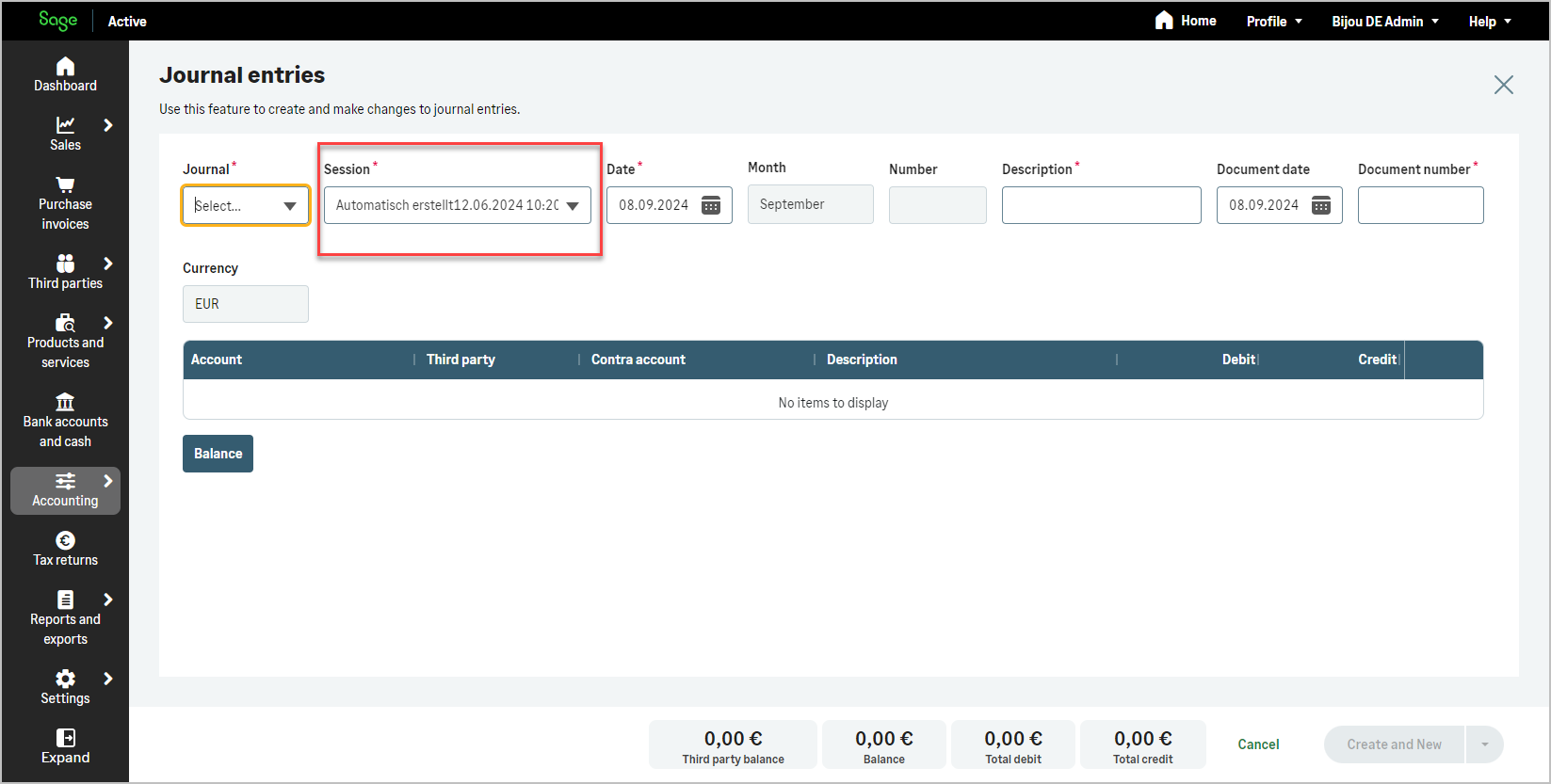
- Not used (For Germany only).
- contraAccount: Lines with a general offset account.
- Not used (For Germany only).
- Not used (For Germany only).
Used only for Germany.
- Not used (For Germany only).
- finishInvoiceNumber:
- Unused for the French market
These fields are used for Spanish simplified invoices when several simplified invoices are grouped into a single accounting entry. Grouping is used to avoid creating one accounting entry per simplified invoice while still keeping the traceability of the invoice number range included in the grouped accounting entry.
- isGroupingInvoices: Indicates whether the accounting entry invoice represents a grouping of several simplified invoices.
- startInvoiceNumber: Indicates the first simplified invoice number included in the grouped invoice range.
- finishInvoiceNumber: Indicates the last simplified invoice number included in the grouped invoice range.
- invoiceType / invoiceTypeId: Identifies the invoice type used for the grouped invoices. In this case, invoiceTypeId is the identifier of the simplified invoice type.
- Unused for the German market
- Unused for the Portuguese market
- equivalenceSurchargeQuota:
- Not used (For Spain only).
These fields relate to the equivalence surcharge (Recargo de Equivalencia), a special VAT regime applicable to specific Spanish retailers.
- hasEquivalenceSurcharge: Indicates whether the surcharge applies to the invoice.
- equivalenceSurchargePercentage: The percentage applied when the surcharge is enabled, depending on product type.
- equivalenceSurchargeQuota: An optional fixed amount used instead of a percentage, in specific tax contexts.
- Not used (For Spain only).
- Not used (For Spain only).
Create by using codes
- description: A value used as a template for lines from the interface, which assigns a default value to the lines.
This value is optional
This value is optional
This value is mandatory even if descriptions are given for each line.
This value is optional
- sessionId: The accounting session associated with the entry (only
DElegislation)This value is not required.
This value is not required.
This value is mandatory and automatically assigned according to the following rules:
- If journalId equals defaultPayrollJournalTypeId, then sessionId is automatically set to defaultPayrollSessionId.
- If journalId differs or if defaultPayrollSessionId is
null, then sessionId is automatically set to the default value from the list of sessions AccountingEntrySession.
This value is not required.
- finishInvoiceNumber:
This value is not used.
These optional fields are used when several simplified invoices are grouped into a single accounting entry.
- isGroupingInvoices: Indicates whether the accounting entry line represents a grouping of several simplified invoices.
- startInvoiceNumber: Indicates the first simplified invoice number included in the grouped invoice range.
- finishInvoiceNumber: Indicates the last simplified invoice number included in the grouped invoice range.
This value is not used.
This value is not used.
Create by using Ids
- description: A value used as a template for lines from the interface, which assigns a default value to the lines.
This value is optional
This value is optional
This value is mandatory even if descriptions are given for each line.
This value is optional
- sessionId: The accounting session associated with the entry (only
DElegislation)This value is not required.
This value is not required.
This value is mandatory and automatically assigned according to the following rules:
- If journalId equals defaultPayrollJournalTypeId, then sessionId is automatically set to defaultPayrollSessionId.
- If journalId differs or if defaultPayrollSessionId is
null, then sessionId is automatically set to the default value from the list of sessions AccountingEntrySession.
This value is not required.
- finishInvoiceNumber:
This value is not used.
These optional fields are used when several simplified invoices are grouped into a single accounting entry.
- isGroupingInvoices: Indicates whether the accounting entry line represents a grouping of several simplified invoices.
- startInvoiceNumber: Indicates the first simplified invoice number included in the grouped invoice range.
- finishInvoiceNumber: Indicates the last simplified invoice number included in the grouped invoice range.
This value is not used.
This value is not used.
⚙️Trial Balance
- showClosingEntries:
- Not used for France
true= Include closing entry lines- Not used for Germany
- Not used for Portugal
- accountType:
- Balance sheet: account classes 1 to 5
- Income statement : account classes 6 and 7
- Special : account classes 8 and 9
E.C.P.N: Unused (For Spain only).Statistical: Unused (For Germany only).
- Balance sheet: account classes 1 to 5
- Income statement : account classes 6 and 7
Special:Unused (For France only).- E.C.P.N : Financial statements in net worth classes 8 and 9
Statistical: Unused (For Germany only).
- Balance sheet: account classes 0, 1, 7, 3970, 3980
- Income statement : account classes 2, 3, 4, 5, 6, 8 (except 3970 & 3980)
Special:Unused (For France only).E.C.P.N: Unused (For Spain only).- Statistical : account classe 9.
- Balance sheet: account classes 1 to 5
- Income statement : account classes 6 and 7
- Special : account classes 8 and 9
E.C.P.N: Unused (For Spain only).Statistical: Unused (For Germany only).
Organization Accounting Setup
- defaultFinancialDiscountAccountId:
- Unused for the French market
- Unused for the Spanish market
- Unused for the German market
- (PT content to be validated with product team)
- taxRegime: Tax Treatment and accounting options vary depending on the organization’s legislation:
- General
- BA IR in revenue expenditure
- BNC IR in revenue expenditure
- Not used for Spain.
- Not used for Germany.
- Not used for Portugal.
- annualAccountsModel: Specifies the applicable annual accounts model:
- Not used for France.
- NORMAL: Standard.
- PYME: (Pequeña y Mediana Empresa) Refers to Small and Medium-sized Enterprises.
- DATEV SKR03: Process-based German Chart of Accounts.
- DATEV SKR04: Function-based German Chart of Accounts.
- Not used (only for German legislation)
- defaultXXXId:
All defaultXXXId fields are valid for the French market, except for the following:
- defaultResultAccountCFId
- defaultCreditorsAccountCFId
- defaultDebtorsAccountCFId
- defaultPayrollSessionId
All defaultXXXId fields are valid for the Spanish market, except for the following:
- defaultProfitAccountCFId
- defaultLossAccountCFId
- defaultOpeningAccountCFId
- defaultCreditorsAccountCFId
- defaultDebtorsAccountCFId
- defaultPayrollJournalTypeId
- defaultPayrollSessionId
All defaultXXXId fields are valid for the German market, except for the following:
- defaultResultAccountCFId
- (PT content to be validated with product team)
Customers
- documentTypeId: allows you to define the type of identification document for the Customer.
In creation, it is automatically set by default based on the legislation and country, and, with few exceptions, does not need to be filled in during creation. Otherwise, to assign a value, retrieve the desired ID from document type.Country Allowed document types (code name) FR 01 SIRET VIES not FR 02 TVA Intracommunautaire Other 06 Autre document justificatif Country Allowed document types (code name) ES 01 NIF/DNI VIES not ES 02 NIF/IVA Other 03 Pasaporte Other 04 Documento oficial emitido en el país de residencia Other 05 Certificado de residencia Other 06 Otro documento probatorio Country Allowed document types (code name) DE 01 Steur-IdN VIES not DE 02 USt-IdNr Other 06 Another supporting document Country Allowed document types (code name) PT 01 NIF VIES not PT 02 NIF/IVA Other 06 Another supporting document - documentId: Identification number, value formats may differ depending on legislationCode.
- For a French Customer, you can fill any SIREN of 9 characters or any SIRET of 14 characters.
The value is not mandatory.
- For a Spanish Customer, you need to fill a valid NIF/DNI/NIE number.
The value is not mandatory.
- For a German Customer, you may enter either a Steuer-IdNr with exactly 11 characters or another value ranging from 11 to 14 characters.
The value is not mandatory.
- For a Portuguese Customer, you can fill a valid NIF (9 digits). The value is not mandatory.
- For a French Customer, you can fill any SIREN of 9 characters or any SIRET of 14 characters.
- vatNumber: An EU VAT Number is a unique identifier for tax purposes within the European Union, used primarily for cross-border transactions. It starts with a two-letter country code followed by a series of numbers and sometimes letters, varying by country.
- This field is not applicable for Customer that are not registered in the VIES system.
- For VIES Customer, the format is described at this FAQ N° 11 https://ec.europa.eu/taxation_customs/vies/#/faq
- If the Customer is FR, the VAT number is recommended but not mandatory.
- If the Customer is VIES but not FR, the VAT number is recommended but not mandatory.
- If the Customer is neither VIES nor FR, the VAT number is not used.
- If the Customer is ES, the VAT number is recommended but not mandatory.
- If the Customer is VIES but not ES, the VAT number is recommended but not mandatory.
- If the Customer is neither VIES nor ES, the VAT number is not used.
- If the Customer is DE, the VAT number is recommended but not mandatory.
- If the Customer is VIES but not DE, the VAT number is recommended but not mandatory.
- If the Customer is neither VIES nor DE, the VAT number is not used.
- If the Customer is PT, the VAT number is recommended but not mandatory.
- If the Customer is VIES but not PT, the VAT number is recommended but not mandatory.
- If the Customer is neither VIES nor PT, the VAT number is not used.
- code: Code of the Customer. During creation, it is automatically calculated if the option is not inactive in Sequence Numbers, otherwise it is a mandatory value.
In any cases, it is still possible to assign it to enforce a specific value.Forcing a value allows you to retrieve an alphanumeric code that can already identify the Customer, even if automatic numbering mode is active.
Forcing a value allows you to retrieve an alphanumeric code that can already identify the Customer, even if automatic numbering mode is active.
- For this legislation
DE, automatic numbering is mandatory and cannot be disabled from Sequence Numbers. - If you force a value, it must be strictly numeric and adhere to the rule of a number being between
10000and69999for customers, and between70000and99999for suppliers or employees.
Forcing a value allows you to retrieve an alphanumeric code that can already identify the Customer, even if automatic numbering mode is active.
- For this legislation
- defaultAccountingAccountId: Id of the general account in accountingAccount associated with the Customer.
The subAccountType of the account must beCUSTOMER.In creation, if defaultAccountingAccountId is not specified, the account defined in Accounting Configuration will be automatically assigned.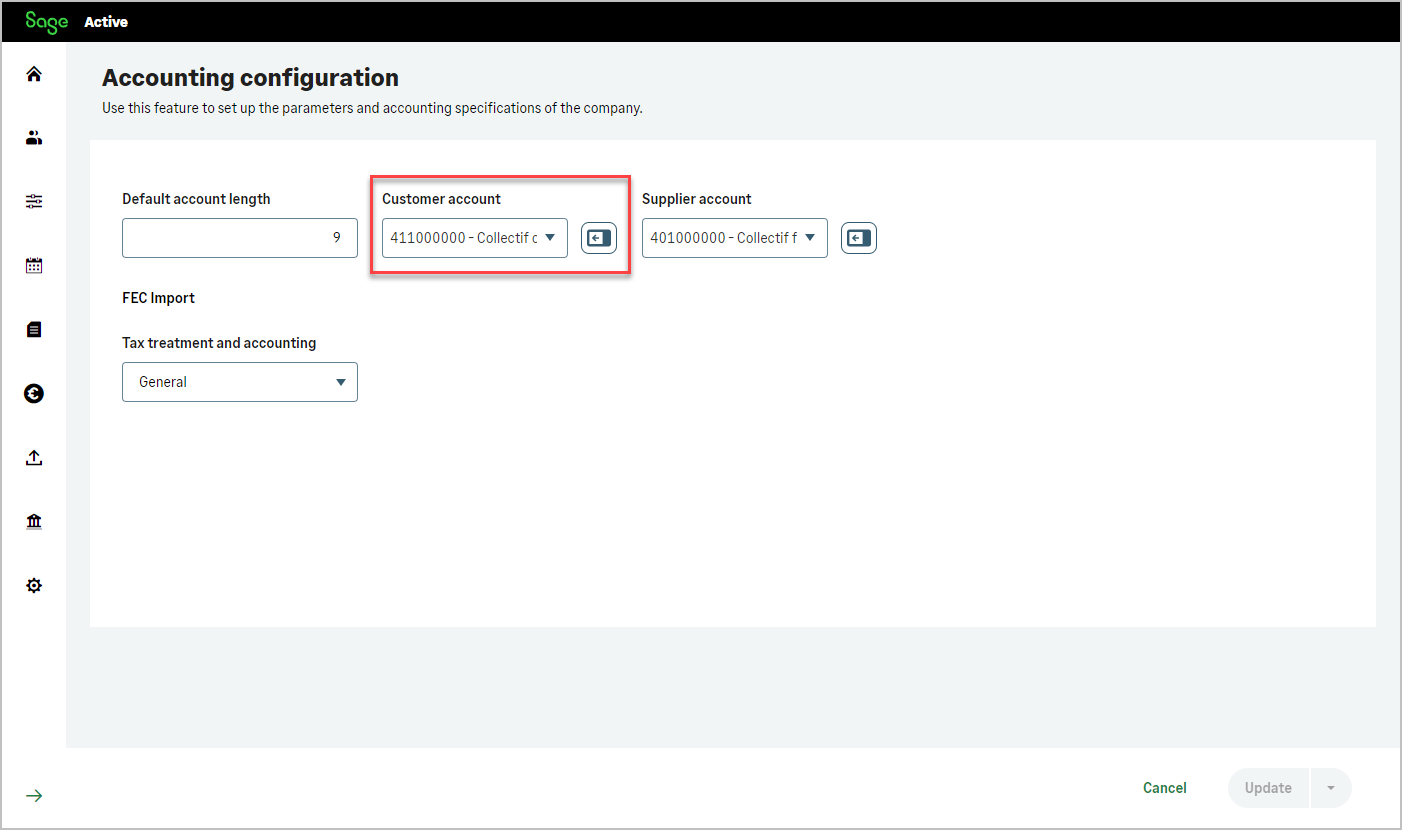 In creation, if defaultAccountingAccountId is not specified, the account defined in Accounting Configuration will be automatically assigned.
In creation, if defaultAccountingAccountId is not specified, the account defined in Accounting Configuration will be automatically assigned.
Caution, as per
DElegislation, assigning a defaultAccountingAccountId is mandatory, if a default value is not provided, it will then be necessary to specify in defaultAccountingAccountId the Customer collective account ID.In creation, if defaultAccountingAccountId is not specified, the account defined in Accounting Configuration will be automatically assigned.
- hasEquivalenceSurcharge:
- Unused for the French market
Indicates whether a customer is subject to the equivalence surcharge regime.
The equivalence surcharge, as applied in Spain, is a form of simplified VAT for retail traders who cannot recover VAT.
The rates of the equivalence surcharge vary according to the VAT rate applicable to the products, with surcharge rates of 5.2% for products with a general VAT of 21%, 1.4% for products with a reduced VAT of 10%, and other rates for different products or categories.More info: API resources / 📝Equivalence Surcharge (🇪🇸)
- Unused for the German market
- Unused for the Portuguese market
- Unused for the French market
- eInvoicingAddress:
- eInvoicingAddressType: Defines the type of address used for electronic invoicing to receive invoices.
Possible values: fr.sirenfr.sirensiretfr.sirensiret_routingfr.siren_suffix- eInvoicingAddress: Contains the identifier registered in the electronic invoicing directory and used to route electronic invoices to the customer.
There are four possible electronic invoicing address formats, depending on how a company organizes its invoice reception: fr.siren(SIREN): A general address for the whole company.
Example:123456782fr.siren_suffix(SIREN + Suffix): Used to route invoices to different departments within the company.
Example:123456782_Accountingfr.sirensiret(SIREN + SIRET): Used to identify a specific establishment or branch.
Example:123456782_12345678200001fr.sirensiret_routing(SIREN + SIRET + Routing Code): Used to direct invoices to a specific department inside a branch or site.
Example:123456782_12345678200001_Bakery
- Unused for the Spanish market
- Unused for the German market
- Unused for the Portuguese market
- eInvoicingAddressType: Defines the type of address used for electronic invoicing to receive invoices.
- printNameOnPdf:
- Unused (Spain only).
- nonIdentifiedCustomer: When this option is selected, the sales invoices for this customer will be simplified invoices (without including the identification number).
- printNameOnPdf: Defines the default value of the “print customer name on simplified invoice” option used when creating an invoice: sales Invoices printNameOnPdf.
- More info: API resources / 📝Simplified Invoice (🇪🇸)
- Unused (Spain only).
- Unused (Spain only).
Suppliers
- documentTypeId: allows you to define the type of identification document for the Customer.
In creation, it is automatically set by default based on the legislation and country, and, with few exceptions, does not need to be filled in during creation. Otherwise, to assign a value, retrieve the desired ID from document type.Country Allowed document types (code name) FR 01 SIRET VIES not FR 02 TVA Intracommunautaire Other 06 Autre document justificatif Country Allowed document types (code name) ES 01 NIF/DNI VIES not ES 02 NIF/IVA Other 03 Pasaporte Other 04 Documento oficial emitido en el país de residencia Other 05 Certificado de residencia Other 06 Otro documento probatorio Country Allowed document types (code name) DE 01 Steur-IdN VIES not DE 02 USt-IdNr Other 06 Another supporting document Country Allowed document types (code name) PT 01 NIF VIES not PT 02 NIF/IVA Other 06 Another supporting document - documentId: Identification number, value formats may differ depending on legislationCode.
- For a French Supplier, you can fill any SIREN of 9 characters or any SIRET of 14 characters.
The value is not mandatory.
- For a Spanish Supplier, you need to fill a valid NIF/DNI/NIE number.
The value is not mandatory.
- For a German Supplier, you may enter either a Steuer-IdNr with exactly 11 characters or another value ranging from 11 to 14 characters.
The value is not mandatory.
- For a Portuguese Supplier, you can fill a valid NIF (9 digits). The value is not mandatory.
- For a French Supplier, you can fill any SIREN of 9 characters or any SIRET of 14 characters.
- vatNumber: An EU VAT Number is a unique identifier for tax purposes within the European Union, used primarily for cross-border transactions. It starts with a two-letter country code followed by a series of numbers and sometimes letters, varying by country.
- This field is not applicable for Supplier that are not registered in the VIES system.
- For VIES Supplier, the format is described at this FAQ N° 11 https://ec.europa.eu/taxation_customs/vies/#/faq
- If the Supplier is FR, the VAT number is recommended but not mandatory.
- If the Supplier is VIES but not FR, the VAT number is recommended but not mandatory.
- If the Supplier is neither VIES nor FR, the VAT number is not used.
- If the Supplier is ES, the VAT number is recommended but not mandatory.
- If the Supplier is VIES but not ES, the VAT number is recommended but not mandatory.
- If the Supplier is neither VIES nor ES, the VAT number is not used.
- If the Supplier is DE, the VAT number is recommended but not mandatory.
- If the Supplier is VIES but not DE, the VAT number is recommended but not mandatory.
- If the Supplier is neither VIES nor DE, the VAT number is not used.
- If the Supplier is PT, the VAT number is recommended but not mandatory.
- If the Supplier is VIES but not PT, the VAT number is recommended but not mandatory.
- If the Supplier is neither VIES nor PT, the VAT number is not used.
- code: Code of the Supplier. During creation, it is automatically calculated if the option is not inactive in Sequence Numbers, otherwise it is a mandatory value.
In any cases, it is still possible to assign it to enforce a specific value.Forcing a value allows you to retrieve an alphanumeric code that can already identify the Supplier, even if automatic numbering mode is active.
Forcing a value allows you to retrieve an alphanumeric code that can already identify the Supplier, even if automatic numbering mode is active.
- For this legislation
DE, automatic numbering is mandatory and cannot be disabled from Sequence Numbers. - If you force a value, it must be strictly numeric and adhere to the rule of a number being between
10000and69999for customers, and between70000and99999for suppliers or employees.
Forcing a value allows you to retrieve an alphanumeric code that can already identify the Supplier, even if automatic numbering mode is active.
- For this legislation
- defaultAccountingAccountId: Id of the general account in accountingAccount associated with the Supplier.
The subAccountType of the account must bePROVIDER.In creation, if defaultAccountingAccountId is not specified, the account defined in Accounting Configuration will be automatically assigned.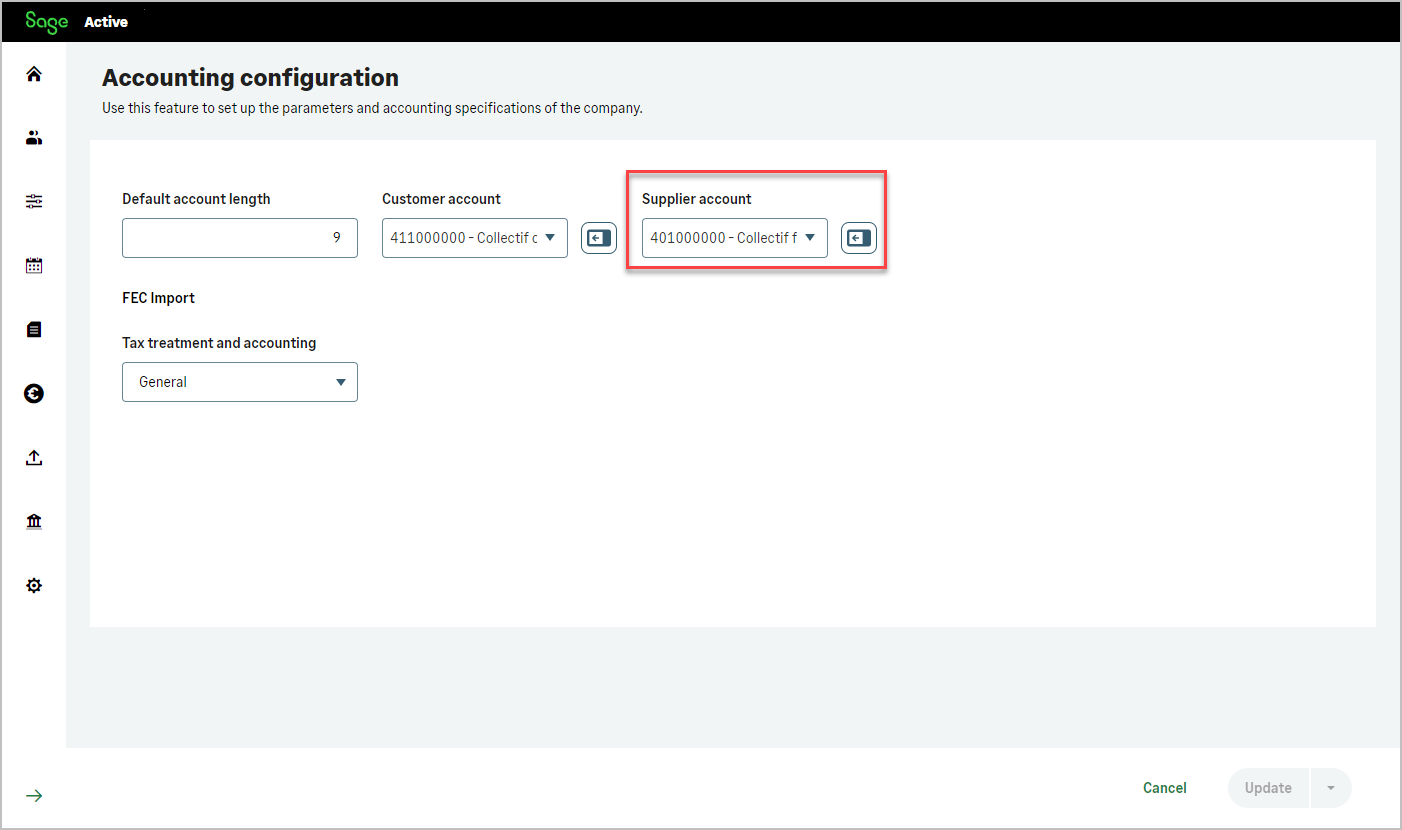 In creation, if defaultAccountingAccountId is not specified, the account defined in Accounting Configuration will be automatically assigned.
In creation, if defaultAccountingAccountId is not specified, the account defined in Accounting Configuration will be automatically assigned.
Caution, as per
DElegislation, assigning a defaultAccountingAccountId is mandatory, if a default value is not provided, it will then be necessary to specify in defaultAccountingAccountId the Supplier collective account ID.In creation, if defaultAccountingAccountId is not specified, the account defined in Accounting Configuration will be automatically assigned.
- vatCriterion: Enable Cash VAT.
- Cash VAT is the scheme applied to services provided by service providers. The implementation of Cash VAT allows automatic consideration of the tax when performing entries and feeds the VAT return.
- Not used (only for France)
- Not used (only for France)
- Not used (only for France)
- personalIncomeTax: Enable Income Tax.
- Not used (only for Spain)
Indicates whether personal income tax is applicable for the supplier.
Iftrue, personal income tax handling is enabled.- Not used (only for Spain)
- Not used (only for Spain)
- taxTreatmentId: Tax treatment applicable.
- Not used (only for Spain)
References the tax treatment applicable to the supplier.
Links to a TaxTreatment object that defines the correct tax handling rules.- Not used (only for Spain)
- Not used (only for Spain)
Employees
- code: Code of the employee.
During creation, it is automatically calculated if the option is active in Sequence Numbers, otherwise it is a mandatory value.
In any cases, it is still possible to assign it to enforce a specific value.Forcing a value allows you to retrieve an alphanumeric code that can already identify the Employee, even if automatic numbering mode is active.
Forcing a value allows you to retrieve an alphanumeric code that can already identify the Employee, even if automatic numbering mode is active.
- If you force a value, it must be strictly numeric and adhere to the rule of a number being between
10000and69999for customers, and between70000and99999for suppliers or employees.
Forcing a value allows you to retrieve an alphanumeric code that can already identify the Employee, even if automatic numbering mode is active.
- If you force a value, it must be strictly numeric and adhere to the rule of a number being between
Products
- useWithholding:
- Unused (Spain only).
This field is specific to the Spanish legislation (IRPF): Indicates whether withholding tax (IRPF) applies to this product.
Iftrue, withholding can be calculated on sales documents using this product.
Iffalse, no withholding will be applied.- Unused (Spain only).
- Unused (Spain only).
- Unused (Spain only).
⚙️Product Price service
- equivalenceSurchargePercentage:
Always 0 as it is unused for the French market
Returns the percentage of the equivalence surcharge if the customer has the option hasEquivalenceSurcharge set to true else returns 0.
The equivalence surcharge, as applied in Spain, is a form of simplified VAT for retail traders who cannot recover VAT.
The rates of the equivalence surcharge vary according to the VAT rate applicable to the products, with surcharge rates of 5.2% for products with a general VAT of 21%, 1.4% for products with a reduced VAT of 10%, and other rates for different products or categories.Always 0 as it is unused for the German market
Always 0 as it is unused for the Portuguese market
Sales quotes
- totalWithholding:
- Unused (Spain only).
The following fields are specific to the Spanish legislation (IRPF):
- totalLiquidNoWithholding:
Total amount excluding withholding tax.
This represents the taxable base before applying IRPF withholding. - totalWithholding:
Total withholding amount (IRPF) calculated at document level.
- Unused (Spain only).
- unused for the Portuguese market
- Unused (Spain only).
- hasCashVat:
- Indicates whether the sales document is subject to Cash VAT.
Cash VAT is the scheme applied to services provided by service providers. The implementation of Cash VAT allows automatic consideration of the tax when performing entries and feeds the VAT return.
- Not used (only for France).
- Indicates whether the sales document is subject to Cash VAT. Cash VAT is the scheme applied to services provided by service providers. The implementation of Cash VAT allows automatic consideration of the tax when performing entries and feeds the VAT return.
- Not used (only for France).
- Indicates whether the sales document is subject to Cash VAT.
- totalVatFee:
- unused for the French market
Indicates whether a customer is subject to the equivalence surcharge regime.
The equivalence surcharge (totalFeeSurcharge), as applied in Spain, is a form of simplified VAT for retail traders who cannot recover VAT.
The rates of the equivalence surcharge vary according to the VAT rate applicable to the products, with surcharge rates of 5.2% for products with a general VAT of 21%, 1.4% for products with a reduced VAT of 10%, and other rates for different products or categories. The equivalence surcharge is calculated on amount of general VAT (totalVatFee).
The hasEquivalenceSurcharge field takes the value defined on the customer record.- unused for the German market
- unused for the Portuguese market
- unused for the French market
- socialName:
mandatory for the French market
no mandatory for the Spanish market
no mandatory for the Germany market
mandatory for the Portuguese market
- vatNumber: An EU VAT Number is a unique identifier for tax purposes within the European Union, used primarily for cross-border transactions. It starts with a two-letter country code followed by a series of numbers and sometimes letters, varying by country.
- This field is not applicable for customers that are not registered in the VIES system.
- For VIES customers, the format is described at this FAQ N° 11 https://ec.europa.eu/taxation_customs/vies/#/faq
mandatory for VIES customers
no mandatory for Spanish market
no mandatory for Germany market
- (PT content to be validated with product team)
- documentId: Identification number, value formats may differ depending on legislationCode.
- For a French , you can fill any SIREN of 9 characters or any SIRET of 14 characters.
The value is not mandatory.
- For a Spanish , you need to fill a valid NIF/DNI/NIE number.
The value is mandatory.
- For a German , you may enter either a Steuer-IdNr with exactly 11 characters or another value ranging from 11 to 14 characters.
The value is not mandatory.
- (PT content to be validated with product team)
- For a French , you can fill any SIREN of 9 characters or any SIRET of 14 characters.
- applyEquivalenceSurcharge:
- Unused for the French market.
- Indicates whether the equivalence surcharge applies to the document line.
Used under Spanish legislation when the customer is subject to the equivalence surcharge regime.
- Unused for the German market.
- Unused for the Portuguese market.
- withholdingPercentage:
- Unused (Spain only).
The following fields are specific to the Spanish legislation (IRPF):
- totalLiquidNoWithholding:
Line total amount excluding withholding tax. - totalWithholding:
Withholding amount (IRPF) calculated for the document line. - withholdingPercentage:
Withholding percentage (IRPF) applied to the line and used to calculate the withholding amount.
- Unused (Spain only).
- Unused (Spain only).
- Unused (Spain only).
Sales orders
- totalWithholding:
- Unused (Spain only).
The following fields are specific to the Spanish legislation (IRPF):
- totalLiquidNoWithholding:
Total amount excluding withholding tax.
This represents the taxable base before applying IRPF withholding. - totalWithholding:
Total withholding amount (IRPF) calculated at document level.
- Unused (Spain only).
- unused for the Portuguese market
- Unused (Spain only).
- hasCashVat:
- Indicates whether the sales document is subject to Cash VAT.
Cash VAT is the scheme applied to services provided by service providers. The implementation of Cash VAT allows automatic consideration of the tax when performing entries and feeds the VAT return.
- Not used (only for France).
- Indicates whether the sales document is subject to Cash VAT. Cash VAT is the scheme applied to services provided by service providers. The implementation of Cash VAT allows automatic consideration of the tax when performing entries and feeds the VAT return.
- Not used (only for France).
- Indicates whether the sales document is subject to Cash VAT.
- totalVatFee:
- unused for the French market
Indicates whether a customer is subject to the equivalence surcharge regime.
The equivalence surcharge (totalFeeSurcharge), as applied in Spain, is a form of simplified VAT for retail traders who cannot recover VAT.
The rates of the equivalence surcharge vary according to the VAT rate applicable to the products, with surcharge rates of 5.2% for products with a general VAT of 21%, 1.4% for products with a reduced VAT of 10%, and other rates for different products or categories. The equivalence surcharge is calculated on amount of general VAT (totalVatFee).
The hasEquivalenceSurcharge field takes the value defined on the customer record.- unused for the German market
- unused for the Portuguese market
- unused for the French market
- socialName:
mandatory for the French market
no mandatory for the Spanish market
no mandatory for the Germany market
mandatory for the Portuguese market
- vatNumber: An EU VAT Number is a unique identifier for tax purposes within the European Union, used primarily for cross-border transactions. It starts with a two-letter country code followed by a series of numbers and sometimes letters, varying by country.
- This field is not applicable for customers that are not registered in the VIES system.
- For VIES customers, the format is described at this FAQ N° 11 https://ec.europa.eu/taxation_customs/vies/#/faq
mandatory for VIES customers
no mandatory for Spanish market
no mandatory for Germany market
- (PT content to be validated with product team)
- documentId: Identification number, value formats may differ depending on legislationCode.
- For a French , you can fill any SIREN of 9 characters or any SIRET of 14 characters.
The value is not mandatory.
- For a Spanish , you need to fill a valid NIF/DNI/NIE number.
The value is mandatory.
- For a German , you may enter either a Steuer-IdNr with exactly 11 characters or another value ranging from 11 to 14 characters.
The value is not mandatory.
- (PT content to be validated with product team)
- For a French , you can fill any SIREN of 9 characters or any SIRET of 14 characters.
- applyEquivalenceSurcharge:
- Unused for the French market.
- Indicates whether the equivalence surcharge applies to the document line.
Used under Spanish legislation when the customer is subject to the equivalence surcharge regime.
- Unused for the German market.
- Unused for the Portuguese market.
- withholdingPercentage:
- Unused (Spain only).
The following fields are specific to the Spanish legislation (IRPF):
- totalLiquidNoWithholding:
Line total amount excluding withholding tax. - totalWithholding:
Withholding amount (IRPF) calculated for the document line. - withholdingPercentage:
Withholding percentage (IRPF) applied to the line and used to calculate the withholding amount.
- Unused (Spain only).
- Unused (Spain only).
- Unused (Spain only).
Sales delivery notes
- totalWithholding:
- Unused (Spain only).
The following fields are specific to the Spanish legislation (IRPF):
- totalLiquidNoWithholding:
Total amount excluding withholding tax.
This represents the taxable base before applying IRPF withholding. - totalWithholding:
Total withholding amount (IRPF) calculated at document level.
- Unused (Spain only).
- unused for the Portuguese market
- Unused (Spain only).
- hasCashVat:
- Indicates whether the sales document is subject to Cash VAT.
Cash VAT is the scheme applied to services provided by service providers. The implementation of Cash VAT allows automatic consideration of the tax when performing entries and feeds the VAT return.
- Not used (only for France).
- Indicates whether the sales document is subject to Cash VAT. Cash VAT is the scheme applied to services provided by service providers. The implementation of Cash VAT allows automatic consideration of the tax when performing entries and feeds the VAT return.
- Not used (only for France).
- Indicates whether the sales document is subject to Cash VAT.
- totalVatFee:
- unused for the French market
Indicates whether a customer is subject to the equivalence surcharge regime.
The equivalence surcharge (totalFeeSurcharge), as applied in Spain, is a form of simplified VAT for retail traders who cannot recover VAT.
The rates of the equivalence surcharge vary according to the VAT rate applicable to the products, with surcharge rates of 5.2% for products with a general VAT of 21%, 1.4% for products with a reduced VAT of 10%, and other rates for different products or categories. The equivalence surcharge is calculated on amount of general VAT (totalVatFee).
The hasEquivalenceSurcharge field takes the value defined on the customer record.- unused for the German market
- unused for the Portuguese market
- unused for the French market
- socialName:
mandatory for the French market
no mandatory for the Spanish market
no mandatory for the Germany market
mandatory for the Portuguese market
- vatNumber: An EU VAT Number is a unique identifier for tax purposes within the European Union, used primarily for cross-border transactions. It starts with a two-letter country code followed by a series of numbers and sometimes letters, varying by country.
- This field is not applicable for customers that are not registered in the VIES system.
- For VIES customers, the format is described at this FAQ N° 11 https://ec.europa.eu/taxation_customs/vies/#/faq
mandatory for VIES customers
no mandatory for Spanish market
no mandatory for Germany market
- (PT content to be validated with product team)
- documentId: Identification number, value formats may differ depending on legislationCode.
- For a French , you can fill any SIREN of 9 characters or any SIRET of 14 characters.
The value is not mandatory.
- For a Spanish , you need to fill a valid NIF/DNI/NIE number.
The value is mandatory.
- For a German , you may enter either a Steuer-IdNr with exactly 11 characters or another value ranging from 11 to 14 characters.
The value is not mandatory.
- (PT content to be validated with product team)
- For a French , you can fill any SIREN of 9 characters or any SIRET of 14 characters.
- applyEquivalenceSurcharge:
- Unused for the French market.
- Indicates whether the equivalence surcharge applies to the document line.
Used under Spanish legislation when the customer is subject to the equivalence surcharge regime.
- Unused for the German market.
- Unused for the Portuguese market.
- withholdingPercentage:
- Unused (Spain only).
The following fields are specific to the Spanish legislation (IRPF):
- totalLiquidNoWithholding:
Line total amount excluding withholding tax. - totalWithholding:
Withholding amount (IRPF) calculated for the document line. - withholdingPercentage:
Withholding percentage (IRPF) applied to the line and used to calculate the withholding amount.
- Unused (Spain only).
- Unused (Spain only).
- Unused (Spain only).
Sales invoices
- totalWithholding:
- Unused (Spain only).
The following fields are specific to the Spanish legislation (IRPF):
- totalLiquidNoWithholding:
Total amount excluding withholding tax.
This represents the taxable base before applying IRPF withholding. - totalWithholding:
Total withholding amount (IRPF) calculated at document level.
- Unused (Spain only).
- unused for the Portuguese market
- Unused (Spain only).
- hasCashVat:
- Indicates whether the sales document is subject to Cash VAT.
Cash VAT is the scheme applied to services provided by service providers. The implementation of Cash VAT allows automatic consideration of the tax when performing entries and feeds the VAT return.
- Not used (only for France).
- Indicates whether the sales document is subject to Cash VAT. Cash VAT is the scheme applied to services provided by service providers. The implementation of Cash VAT allows automatic consideration of the tax when performing entries and feeds the VAT return.
- Not used (only for France).
- Indicates whether the sales document is subject to Cash VAT.
- totalVatFee:
- unused for the French market
Indicates whether a customer is subject to the equivalence surcharge regime.
The equivalence surcharge (totalFeeSurcharge), as applied in Spain, is a form of simplified VAT for retail traders who cannot recover VAT.
The rates of the equivalence surcharge vary according to the VAT rate applicable to the products, with surcharge rates of 5.2% for products with a general VAT of 21%, 1.4% for products with a reduced VAT of 10%, and other rates for different products or categories. The equivalence surcharge is calculated on amount of general VAT (totalVatFee).
The hasEquivalenceSurcharge field takes the value defined on the customer record.- unused for the German market
- unused for the Portuguese market
- unused for the French market
- socialName:
mandatory for the French market
no mandatory for the Spanish market
no mandatory for the Germany market
mandatory for the Portuguese market
- vatNumber: An EU VAT Number is a unique identifier for tax purposes within the European Union, used primarily for cross-border transactions. It starts with a two-letter country code followed by a series of numbers and sometimes letters, varying by country.
- This field is not applicable for customers that are not registered in the VIES system.
- For VIES customers, the format is described at this FAQ N° 11 https://ec.europa.eu/taxation_customs/vies/#/faq
mandatory for VIES customers
no mandatory for Spanish market
no mandatory for Germany market
- (PT content to be validated with product team)
- documentId: Identification number, value formats may differ depending on legislationCode.
- For a French , you can fill any SIREN of 9 characters or any SIRET of 14 characters.
The value is not mandatory.
- For a Spanish , you need to fill a valid NIF/DNI/NIE number.
The value is mandatory.
- For a German , you may enter either a Steuer-IdNr with exactly 11 characters or another value ranging from 11 to 14 characters.
The value is not mandatory.
- (PT content to be validated with product team)
- For a French , you can fill any SIREN of 9 characters or any SIRET of 14 characters.
- shouldSendViaElectronicInvoicing: NEWNew Feature Recently Added. (Introduced in the last version as well as in the previous version)
The following fields are specific to the French legislation (electronic invoicing):
- eInvoiceId:
Identifier of the electronic invoice. - eInvoicingAddressTypeCustomer:
Defines the type of electronic invoicing address of the customer associated with the invoice. - eInvoicingAddressCustomer:
Electronic invoicing address of the customer associated with the invoice, used to route the electronic invoice.
See also customer fields eInvoicingAddressType and eInvoicingAddress. - eInvoicingStatus:
Standardized status for e-invoicing that enables tracking of the invoice lifecycle. - regulatoryBillingFramework:
Regulatory billing framework applied to the invoice. Possible values: B1: Submission of an invoice for goodsS1: Submission of an invoice for servicesM1: Submission of a mixed invoice (delivery of goods and services that are not incidental to each other)B4: Submission of a final invoice for goods after a down paymentM4: Submission of a final mixed invoice after a down paymentS4: Submission of a final invoice for services after a down payment- shouldSendViaElectronicInvoicing:
Indicates that the invoice is sent via electronic invoicing.
The value depends on the customer e-invoicing qualification: it istruewhen eInvoicingAddressType and eInvoicingAddress are filled on the customer, otherwisefalse.
- Unused (France only).
- Unused (France only).
- Unused (France only).
- eInvoiceId:
- printNameOnPdf:
- Unused (Spain only).
When
true, the customer name is printed on the simplified invoice PDF.
On creation, this option can be pre-filled from the customer’s printNameOnPdf default and then changed on the invoice if needed.- More info: API resources / 📝Simplified Invoice (🇪🇸)
- Unused (Spain only).
- Unused (Spain only).
- applyEquivalenceSurcharge:
- Unused for the French market.
- Indicates whether the equivalence surcharge applies to the document line.
Used under Spanish legislation when the customer is subject to the equivalence surcharge regime.
- Unused for the German market.
- Unused for the Portuguese market.
- withholdingPercentage:
- Unused (Spain only).
The following fields are specific to the Spanish legislation (IRPF):
- totalLiquidNoWithholding:
Line total amount excluding withholding tax. - totalWithholding:
Withholding amount (IRPF) calculated for the document line. - withholdingPercentage:
Withholding percentage (IRPF) applied to the line and used to calculate the withholding amount.
- Unused (Spain only).
- Unused (Spain only).
- Unused (Spain only).
Organization Sales Setup
- salesReceiptDefaultPresetTextId:
- Unused for the French market
- Unused for the Spanish market
- Unused for the German market
- (PT content to be validated with product team)
- useVATRatesForDOM:
This allows you to select VAT rates for DOM in sales entities.
- Not used for Spanish Market
- Not used for German Market
- Not used for Portuguese Market
- defaultSalesPostingInvoiceSessionId:
- Not used for French Market
- Not used for Spanish Market
Used to define the Session preference for posting a sales invoice to your accounting records.
- Not used for Portuguese Market
- defaultPurchasePostingInvoiceSessionId:
- Not used for French Market
- Not used for Spanish Market
Used to define the Session preference for posting a purchase invoice to your accounting records.
- Not used for Portuguese Market
- nonIdentifiedSalesInvoiceDefaultPresetTextId:
- Unused (Spain only).
- askGenerateNonIdentifiedSalesInvoicesByDefault: When
true, simplified invoices are used for individual customers by default. - nonIdentifiedSalesInvoiceMaxAmount: Warning threshold for simplified invoice amounts.
- nonIdentifiedSalesInvoiceDefaultPresetTextId: Id of the default operational number preset text applied when creating a simplified invoice (factura simplificada).
It works like salesInvoiceDefaultPresetTextId, but specifically for non-identified (simplified) sales invoices.
More info: Simplified Invoice.
- Unused (Spain only).
- Unused (Spain only).
Organization IRPF Setup (🇪🇸)
- name: , percentage
- Unused (Spain only).
- name: Label of the withholding rate configured for the organization.
- percentage: Percentage applied when calculating IRPF withholding on eligible sales documents and lines.
- Unused (Spain only).
- Unused (Spain only).
Organization E-Invoice Setup (🇫🇷)
- status:
This field indicates whether the organization is registered with the Sage Plateforme Agréée (PA).- Accepted: The organization is registered with the Plateforme Agréée (PA); registration / connection has been accepted.
- InProgress: Registration / connection with the Plateforme Agréée is in progress.
- Failed: Registration / connection with the Plateforme Agréée has failed.
- Unused (France only).
- Unused (France only).
- Unused (France only).
Operational Number Preset Texts
- operationalNumberSeriesType:
- Unused for the French market
- Unused for the Spanish market
- Unused for the German market
- (PT content to be validated with product team)
Purchase invoices
- status: - OCR Recognization
Uploading: The invoice has been created but only contains the file name; it has not yet been processed.SbdRejected: It is returned when the uploaded document was rejected by the antivirus (for example, if the file was password-protected or infected).- Purchase Invoice
Pending: (Pending) The invoice can be modified; it has not yet been transferred to accounting.Closed: (Pending) The invoice was supposed to be transferred to accounting, but the operation failed or was canceled.Posted: (Awaiting payment) The invoice can no longer be modified; it has been transferred to accounting.PartiallyPaid: (Partially paid) The invoice is partially paid. Payments are pending.Paid: (Paid) The invoice is fully paid.AwaitingDecisionNEWNew Feature Recently Added. (Introduced in the last version as well as in the previous version):RefusedNEWNew Feature Recently Added. (Introduced in the last version as well as in the previous version):PartiallyAcceptedNEWNew Feature Recently Added. (Introduced in the last version as well as in the previous version):AcceptedNEWNew Feature Recently Added. (Introduced in the last version as well as in the previous version)
The following status values are specific to French electronic invoices:
- AwaitingDecision:
Electronic invoice for which a decision must be taken (approval / refusal, etc.). - Refused:
Electronic invoice that has been refused. - PartiallyAccepted:
Electronic invoice that has been partially accepted. - Accepted:
Electronic invoice that has been accepted.
- Unused (France only).
- Unused (France only).
- Unused (France only).
- purchaseType: COMING SOON This feature is currently in development and will be available in the next version. It’s already documented to keep you informed about its upcoming availability
- NORMAL: Required when buyer needs VAT deduction.
- SIMPLIFIED: For amounts up to €150 including VAT.
- NORMAL: Required when buyer needs VAT deduction.
- SIMPLIFIED: For amounts up to €400 including VAT.
- NORMAL: Required when buyer needs VAT deduction.
- SIMPLIFIED: For amounts up to €250 including VAT.
- NORMAL: Required when buyer needs VAT deduction.
- SIMPLIFIED: For amounts up to €400 including VAT.
- eInvoicingStatus: NEWNew Feature Recently Added. (Introduced in the last version as well as in the previous version)
The following fields are specific to the French legislation (electronic invoicing):
- eInvoiceId:
Identifier of the electronic invoice. - isEInvoice:
Indicates whether the purchase invoice is an electronic invoice. - isEInvoiceCreditNote:
Indicates whether the electronic invoice is a credit note. - eInvoicingStatus:
Standardized status for e-invoicing that enables tracking of the invoice lifecycle.
- Unused (France only).
- Unused (France only).
- Unused (France only).
- eInvoiceId: