These settings control the layout, style, content, and export options applied to sales documents such as quotes, orders, delivery notes, invoices, and credit notes.
Organization Sales Setup Docs
Quick Links
Accounts Accounting Entries Products Customers Sales quotes Sales invoices Suppliers Purchase invoices| HTTP | Operation | Type | Object |
|---|---|---|---|
| Query | organizationSalesSetupDocsCustomizationByOrgId |
Description
The organizationSalesSetupDocsCustomizationByOrgId operation allows developers to fetch the sales document customization settings configured for a specific organization.
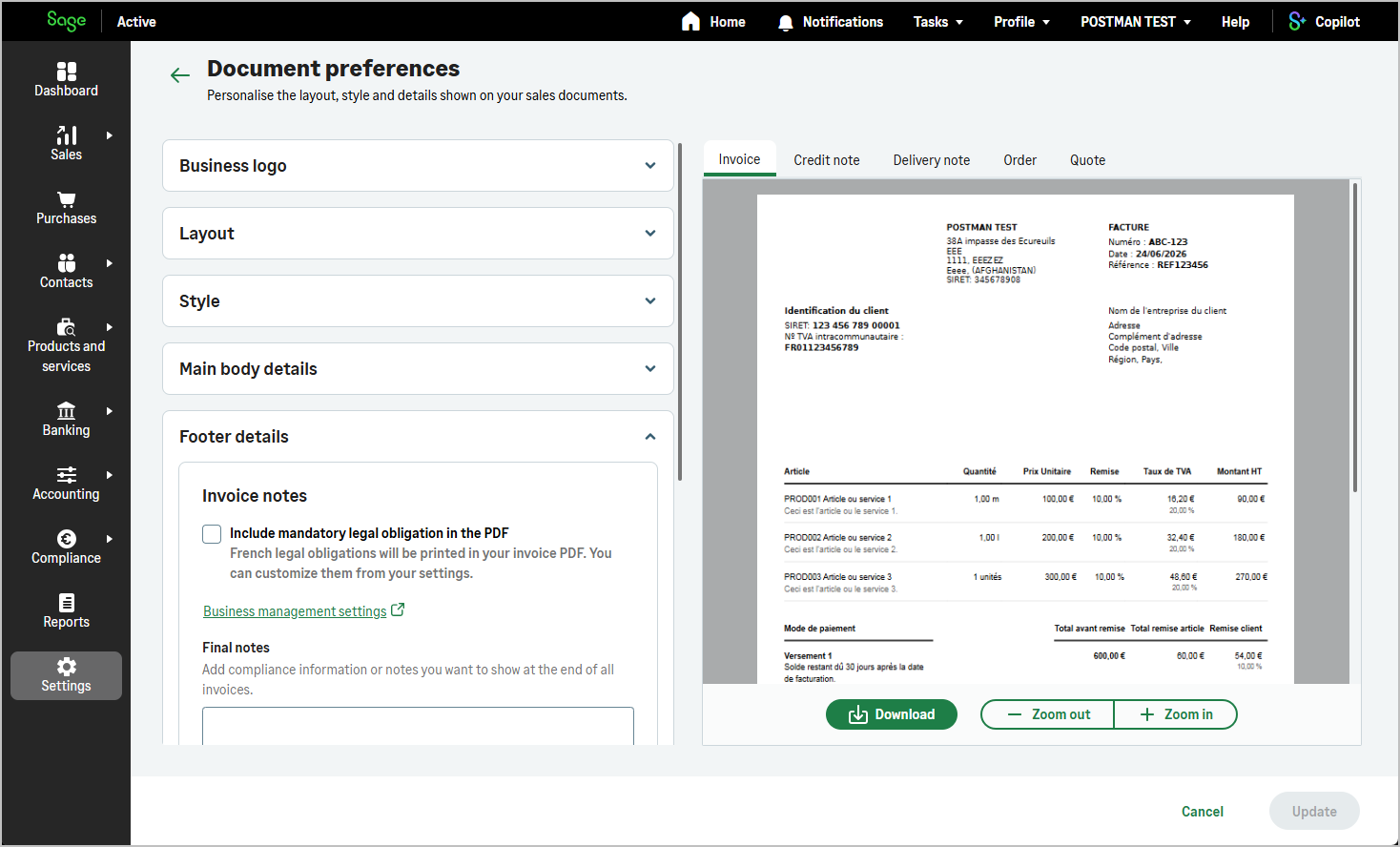
How to use organizationSalesSetupDocsCustomizationByOrgId ?
graphQL Query
query ($id: ID!) {
    organizationSalesSetupDocsCustomizationByOrgId(id: $id) {
        id
        creationDate
        modificationDate
        logoSizePercentage
        salesDocumentCustomizationLogoPosition
        salesDocumentCustomizationCompanyDetailsPosition
        salesDocumentCustomizationCustomerAddressPosition
        salesDocumentCustomizationDescriptionWidth
        salesDocumentCustomizationStyle
        salesDocumentCustomizationFontFamilyName
        salesDocumentCustomizationFontSize
        salesDocumentCustomizationFontColor
        salesDocumentCustomizationBackgroundImageFit
        salesDocumentCustomizationBackgroundImageOpacity
        applyExportColorToAllDocuments
        salesQuotesExportColor
        salesOrdersExportColor
        salesDeliveryNotesExportColor
        salesInvoicesExportColor
        salesCreditNotesExportColor
        showProductCodeQuotes
        showProductNameQuotes
        showProductDescriptionQuotes
        showProductCodeOrders
        showProductNameOrders
        showProductDescriptionOrders
        showProductCodeDeliveryNotes
        showProductNameDeliveryNotes
        showProductDescriptionDeliveryNotes
        showPricingAndAmountDeliveryNotes
        showProductCodeInvoices
        showProductNameInvoices
        showProductDescriptionInvoices
        showDeliveryAddressInvoices
        salesInvoicesIntroText
        showProductCodeCreditNotes
        showProductNameCreditNotes
        showProductDescriptionCreditNotes
        showDeliveryAddressCreditNotes
        salesCreditNotesIntroText
        salesQuotesIntroText
        salesOrdersIntroText
        salesDeliveryNotesIntroText
        specialMention
        legalTextFirstLine
        legalTextSecondLine
        numberOfCopiesForQuotes
        numberOfCopiesForOrders
        numberOfCopiesForInvoices
        numberOfCopiesForCreditNotes
        numberOfCopiesForReceipts
    }
}
graphQL Variables
{
    "id":"{{X-OrganizationId}}"
}
Example Response
{
    "data": {
        "organizationSalesSetupDocsCustomizationByOrgId": {
            "id": "01234567-89ab-cdef-0123-456789abcdef",
            "creationDate": "2026-06-01T10:00:00Z",
            "modificationDate": "2026-06-15T14:30:00Z",
            "logoSizePercentage": 50,
            "salesDocumentCustomizationFontColor": "#000000",
            "salesDocumentCustomizationBackgroundImageOpacity": 100,
            "applyExportColorToAllDocuments": false,
            "salesQuotesExportColor": "#000000",
            "salesOrdersExportColor": "#000000",
            "salesDeliveryNotesExportColor": "#000000",
            "salesInvoicesExportColor": "#000000",
            "salesCreditNotesExportColor": "#000000",
            "showProductCodeQuotes": true,
            "showProductNameQuotes": true,
            "showProductDescriptionQuotes": true,
            "showProductCodeOrders": true,
            "showProductNameOrders": true,
            "showProductDescriptionOrders": true,
            "showProductCodeDeliveryNotes": true,
            "showProductNameDeliveryNotes": true,
            "showProductDescriptionDeliveryNotes": true,
            "showPricingAndAmountDeliveryNotes": false,
            "showProductCodeInvoices": true,
            "showProductNameInvoices": true,
            "showProductDescriptionInvoices": true,
            "showDeliveryAddressInvoices": false,
            "salesInvoicesIntroText": "",
            "showProductCodeCreditNotes": true,
            "showProductNameCreditNotes": true,
            "showProductDescriptionCreditNotes": true,
            "showDeliveryAddressCreditNotes": false,
            "salesCreditNotesIntroText": "",
            "salesQuotesIntroText": "",
            "salesOrdersIntroText": "",
            "salesDeliveryNotesIntroText": "",
            "specialMention": "Payment is due within 30 days. Late payments may incur interest charges.",
            "legalTextFirstLine": "Acme Trading Ltd - 12 Commerce Street, 75001 Paris - contact@acme-trading.com",
            "legalTextSecondLine": "SIRET 123 456 789 00012 - VAT FR12345678901",
            "numberOfCopiesForQuotes": 1,
            "numberOfCopiesForOrders": 1,
            "numberOfCopiesForInvoices": 1,
            "numberOfCopiesForCreditNotes": 1,
            "numberOfCopiesForReceipts": 1
        }
    }
}
Header
| Key | Value |
|---|---|
Authorization |
Bearer Current access Token How to find? |
X-TenantId |
Current tenant id Why deprecated ? |
X-OrganizationId |
Current organization Id How to find? |
x-api-key |
Primary or secondary subscription key of your app How to find? |
organizationSalesSetupDocsCustomizationByOrgId
| Fields | Type | Description |
|---|---|---|
| id | UUID | Id |
| creationDate | DateTime | Creation Date |
| modificationDate | DateTime | Modification Date |
| Layout | ||
| logoSizePercentage | Int | Logo size percentage |
| salesDocumentCustomizationLogoPosition |
|
Business logo position on sales documents |
| salesDocumentCustomizationCompanyDetailsPosition |
|
Business details position on sales documents |
| salesDocumentCustomizationCustomerAddressPosition |
|
Customer address position on sales documents |
| salesDocumentCustomizationDescriptionWidth |
|
Product or service description width on sales documents |
| Style | ||
| salesDocumentCustomizationStyle |
|
Sales document customization style |
| salesDocumentCustomizationFontFamilyName |
|
Default font family |
| salesDocumentCustomizationFontSize |
|
Default font size |
| salesDocumentCustomizationFontColor | String | Default font colour (HEX code) |
| salesDocumentCustomizationBackgroundImageFit |
|
Background image fit mode |
| salesDocumentCustomizationBackgroundImageOpacity | Int | Background image opacity |
| Colour scheme | ||
| applyExportColorToAllDocuments | Boolean | Apply the same export colour to all document types |
| salesQuotesExportColor | String | Export colour for quotes (HEX code) |
| salesOrdersExportColor | String | Export colour for orders (HEX code) |
| salesDeliveryNotesExportColor | String | Export colour for delivery notes (HEX code) |
| salesInvoicesExportColor | String | Export colour for invoices (HEX code) |
| salesCreditNotesExportColor | String | Export colour for credit notes (HEX code) |
| Items table (Quotes) | ||
| showProductCodeQuotes | Boolean | Show product or service code on quotes |
| showProductNameQuotes | Boolean | Show product or service name on quotes |
| showProductDescriptionQuotes | Boolean | Show product or service description on quotes |
| salesQuotesIntroText | String | Personalised introduction text for quotes |
| Items table (Orders) | ||
| showProductCodeOrders | Boolean | Show product or service code on orders |
| showProductNameOrders | Boolean | Show product or service name on orders |
| showProductDescriptionOrders | Boolean | Show product or service description on orders |
| salesOrdersIntroText | String | Personalised introduction text for orders |
| Items table (Delivery notes) | ||
| showProductCodeDeliveryNotes | Boolean | Show product or service code on delivery notes |
| showProductNameDeliveryNotes | Boolean | Show product or service name on delivery notes |
| showProductDescriptionDeliveryNotes | Boolean | Show product or service description on delivery notes |
| showPricingAndAmountDeliveryNotes | Boolean | Show pricing and amount on delivery notes |
| salesDeliveryNotesIntroText | String | Personalised introduction text for delivery notes |
| Items table (Invoices) | ||
| showProductCodeInvoices | Boolean | Show product or service code on invoices |
| showProductNameInvoices | Boolean | Show product or service name on invoices |
| showProductDescriptionInvoices | Boolean | Show product or service description on invoices |
| showDeliveryAddressInvoices | Boolean | Show the delivery address on invoices |
| salesInvoicesIntroText | String | Personalised introduction text for invoices |
| Items table (Credit notes) | ||
| showProductCodeCreditNotes | Boolean | Show product or service code on credit notes |
| showProductNameCreditNotes | Boolean | Show product or service name on credit notes |
| showProductDescriptionCreditNotes | Boolean | Show product or service description on credit notes |
| showDeliveryAddressCreditNotes | Boolean | Show the delivery address on credit notes |
| salesCreditNotesIntroText | String | Personalised introduction text for credit notes |
| Footer details | ||
| specialMention | String | Final notes displayed at the end of sales documents |
| legalTextFirstLine | String | First line of footer legal or contact information |
| legalTextSecondLine | String | Second line of footer legal or contact information |
| Number of copies | ||
| numberOfCopiesForQuotes | Int | Number of copies generated for quotes |
| numberOfCopiesForOrders | Int | Number of copies generated for orders |
| numberOfCopiesForInvoices | Int | Number of copies generated for invoices |
| numberOfCopiesForCreditNotes | Int | Number of copies generated for credit notes |
| numberOfCopiesForReceipts | Int | Number of copies generated for receipts |
Info
-
salesQuotesIntroText:
In the web application UI, corresponds to Personalised introduction (quotes section of sales document customization).
Default for comments when creating a new sales quote. -
salesOrdersIntroText:
In the web application UI, corresponds to Personalised introduction (orders section).
Default for comments when creating a new sales order. -
salesDeliveryNotesIntroText:
In the web application UI, corresponds to Personalised introduction (delivery notes section).
Default for comments when creating a new sales delivery note. -
salesInvoicesIntroText:
In the web application UI, corresponds to Personalised introduction (invoices section).
Default for comments when creating a new sales invoice. -
salesCreditNotesIntroText:
In the web application UI, corresponds to Personalised introduction (credit notes section).
Default for comments when creating a new sales credit note. -
specialMention: Default free-text defined at organization level for sales documents.
In the web application UI, this value is appended after the customer’s specialMention when pre-filling specialMention on a new invoice.
Via the API, retrieve this value from organizationSalesSetupDocsCustomizationByOrgId and merge it with the customer’s mention when creating a sales invoice, see on the Sales invoice page specialMention.